Most people know automation can give them leverage.
Create systems that do work while you focus on higher-value tasks.
But where do you start if you're not technical?
Even "no-code" automation tools have a learning curve that stops most people.
Data flows. APIs. How different services connect. Concepts that aren't obvious to non-technical people.
It's the gap between "this should be simple" and "why is this taking me hours?"
Here's how I'm using AI to bridge that gap:
Instead of spending time on technical setup from scratch, I describe what I want in plain text and have AI build the first pass at the workflow.
Still not easy, but dramatically easier.
Sounds great, but how do I start?
The platform I'm using is n8n, there are others, but n8n has advantages when creating AI-assisted automations.
n8n is a low-code workflow automation platform that connects your apps and handles tasks automatically through a visual design tool.

Here are the simple steps to set up AI to help you create your first workflow:
How to Set Up Your n8n Workflow Builder
Follow these steps to set up your AI automation expert and create your first n8n workflow.
Step 1: Create a project in Claude (or ChatGPT)
- I call mine "n8n workflow builder"
- Projects let you set custom instructions and upload files that AI remembers across all conversations. This ensures consistent, knowledgeable responses every time you work on automation

Step 2: Add this prompt to the project's instructions
- This prompt trains AI to think like an automation expert
- It knows N8N's structure, best practices, and how to output the JSON format that N8N can import directly

Step 3: Upload this file to the project's knowledge base
- This is n8n's documentation scraped from GitHub (from 7/1/25)
- Download it, then click "Add files" or "Project files" and upload the file
- It gives AI detailed knowledge of available nodes, parameters, and connection methods. May be slightly outdated now, but covers the core functionality you'll need AI to know

Step 4: Describe the automation you want to build
- Start a new chat within the project
- Be specific about your trigger (what starts the automation), the data you want to process, and the end result
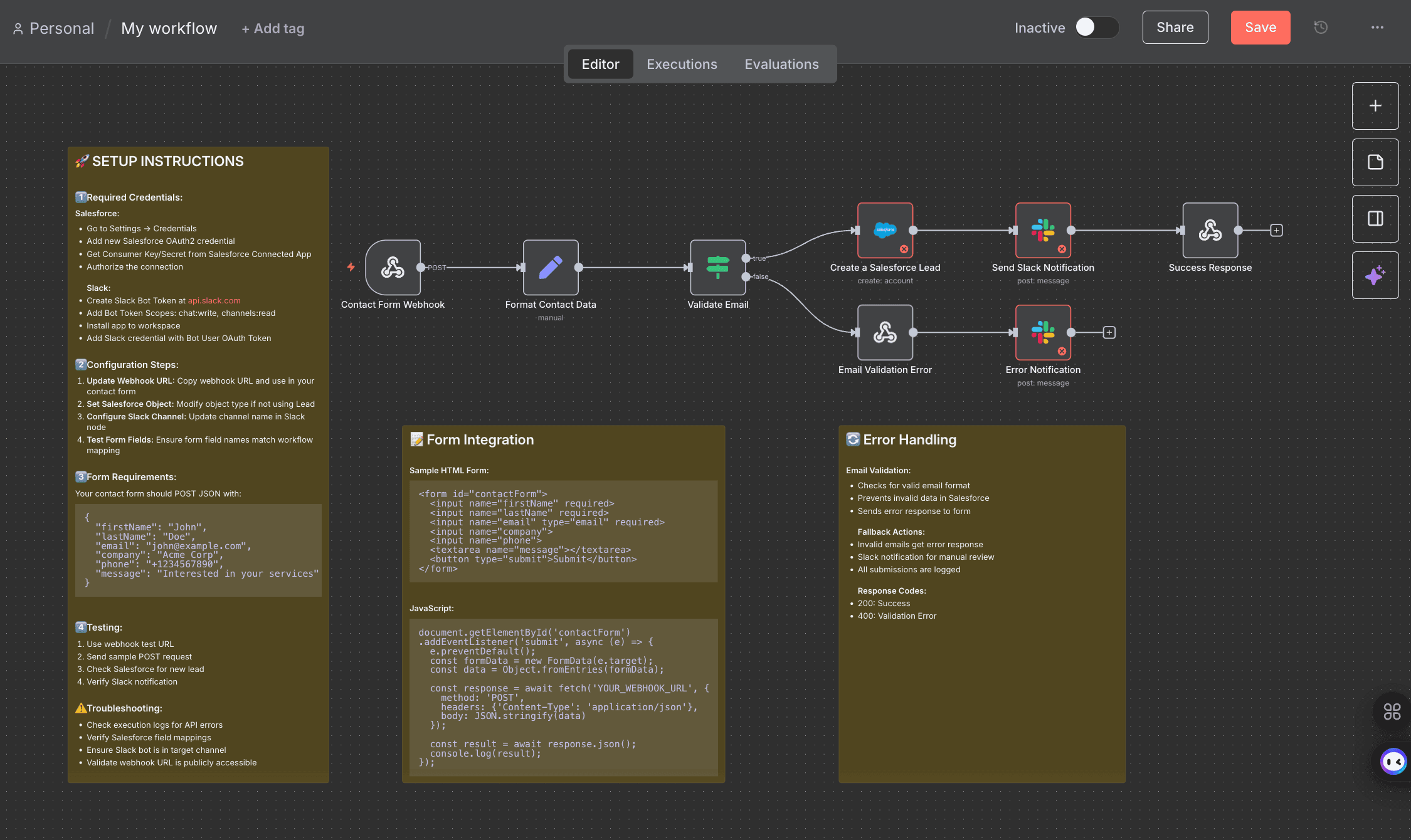
- For example: "When someone submits our contact form, add them to our Salesforce database and send a Slack notification to the sales team"

Step 5: AI creates a workflow file
- AI outputs the complete workflow as a JSON file that N8N can understand
- This includes all the nodes (steps), connections, and basic configuration
- Copy this JSON code and save it as a .json file on your computer


Step 7: Upload the AI-created file to n8n
- In your new workflow, click the "..." menu in the upper right corner, then select "Import from file..."
- Choose your saved JSON file. Your AI-designed workflow will appear visually with all nodes and connections in place
- You may need to rearrange the components or instruction notes for better visibility once uploaded


Step 8: Connect your external tools by setting up credentials
- Each service in your workflow (Gmail, Slack, Salesforce, Airtable, etc.) needs authentication
- Read included instructions for set up help
- Click on each red node and add your connection authorization (API keys or OAuth). n8n guides you through this process for each service


Step 9: Test & refine workflow
- After tools are connected, click the "Execute Workflow" button to run it
- You'll likely encounter errors (missing fields, incorrect data formats, or connection issues). Copy any error messages back to your AI n8n builder project for troubleshooting suggestions and workflow adjustments


You're in.
There's still a learning curve, but you've done the hard part of starting.
AI made it dramatically easier to get your first workflow running.
Push through the initial setup friction and the possibilities are endless.
Pro tip: Don't forget AI can work inside your workflows too. Ask yourself what decisions you'd normally make manually, then have AI make those calls automatically. Ask AI where AI nodes could help make your workflow better.
That's where AI and automation gets powerful.