






 Anthropicfeature
Claude Code /ultrareview and Auto Mode for Max
A dedicated review command for Claude Code plus longer unattended runs for Max users.
- Best for: Catching issues before shipping and letting long Claude Code tasks finish without babysitting
- When to use it: Before merging changes, or when starting a task you don't want to interrupt
- Who benefits: Developers using Claude Code, especially on Max plans
AnthropicmodelClaude Opus 4.7
Anthropic's new flagship model, tuned for long-running tasks with stronger instruction-following and self-verification.
- Best for: Hard, multi-step work you want to hand off with less supervision
- When to use it: Code reviews, long research runs, or complex agent tasks where accuracy matters more than speed
- Who benefits: Engineers, researchers, and anyone on Claude Code or Max plans
 Googlefeature
Gemini on Mac
Native macOS Gemini app with screen/file sharing for third party in-app help, free for all Gemini users on macOS 15 or later.

- Best for: getting AI help on your Mac without leaving the app you are working in
- When to use it: reach for Gemini mid-task instead of tabbing out to a browser to ask a question
- Who benefits: Mac users who use Gemini regularly and want it as a resident desktop assistant
GooglemodelGemini 3.1 Flash TTS
New text-to-speech model that can adjust vocal style, pace, and delivery across 70+ languages, available in preview.

- Best for: generating studio-quality narration and voiceovers from scripts
- When to use it: need fine control over vocal delivery for a voice product, demo, or script
- Who benefits: developers building voice features in the Gemini API and Workspace users editing with Google Vids
GooglefeatureSkills in Chrome
Save AI prompts as reusable one-click workflows in Gemini in Chrome, and run them on the page you are browsing.

- Best for: turning a process you do (recipe tweaks, spec comparisons, doc scans) into a saved workflow you can trigger on any page
- When to use it: you have written a prompt you keep pasting into Gemini in Chrome and want it one click away instead
- Who benefits: marketers, researchers, and anyone doing repeated web tasks they lean on routinely
AnthropicfeatureClaude Code Routines
Save a Claude Code config once (prompt, repos, connectors) and run it on a schedule, API call, or GitHub event from Anthropic-managed cloud.

- Best for: unattended, repeatable work tied to a clear outcome like nightly backlog cleanup or on-deploy smoke checks
- When to use it: you want Claude to act on a cadence or an event without you starting a session
- Who benefits: Pro, Max, Team, and Enterprise users with Claude Code on the web enabled
AnthropicfeatureClaude Code Desktop Redesign
Redesigned Claude desktop app for Claude Code with side-by-side multi-session, integrated terminal, file editing, and preview built in.

- Best for: devs or non-technical users running several Claude Code tasks at once without juggling terminal windows or tabs
- When to use it: you want to review, edit, and preview changes from one drag-and-drop layout instead of the CLI
- Who benefits: Claude Code users on Pro, Max, Team, or Enterprise plans
 OpenAImodel
GPT-5.4-Cyber
A version of GPT-5.4 specialized for security work, available to security teams through OpenAI's expanded access program.
- Best for: security and coding teams checking software for weaknesses or analyzing malware
- When to use it: you need an AI that will help with security tasks instead of refusing them
- Who benefits: in-house security teams, researchers, and security vendors
GooglefeatureNotebookLM Plus for Educators
Schools on Google Workspace for Education Plus or the Teaching and Learning add-on now get higher NotebookLM usage limits at no extra cost, shown with a new Plus badge on profiles.

- Best for: Schools already on Education Plus that want more NotebookLM headroom for classroom use
- When to use it: For gathering sources and creating interactive learning environments, quizzes, flashcards, or audio/video overviews
- Who benefits: Teachers and students on Google Workspace for Education Plus or the Teaching and Learning add-on
AnthropicfeatureClaude for Word
Claude now works inside Microsoft Word as a sidebar assistant. Drafts, edits, and revisions appear as tracked changes so you stay in control.
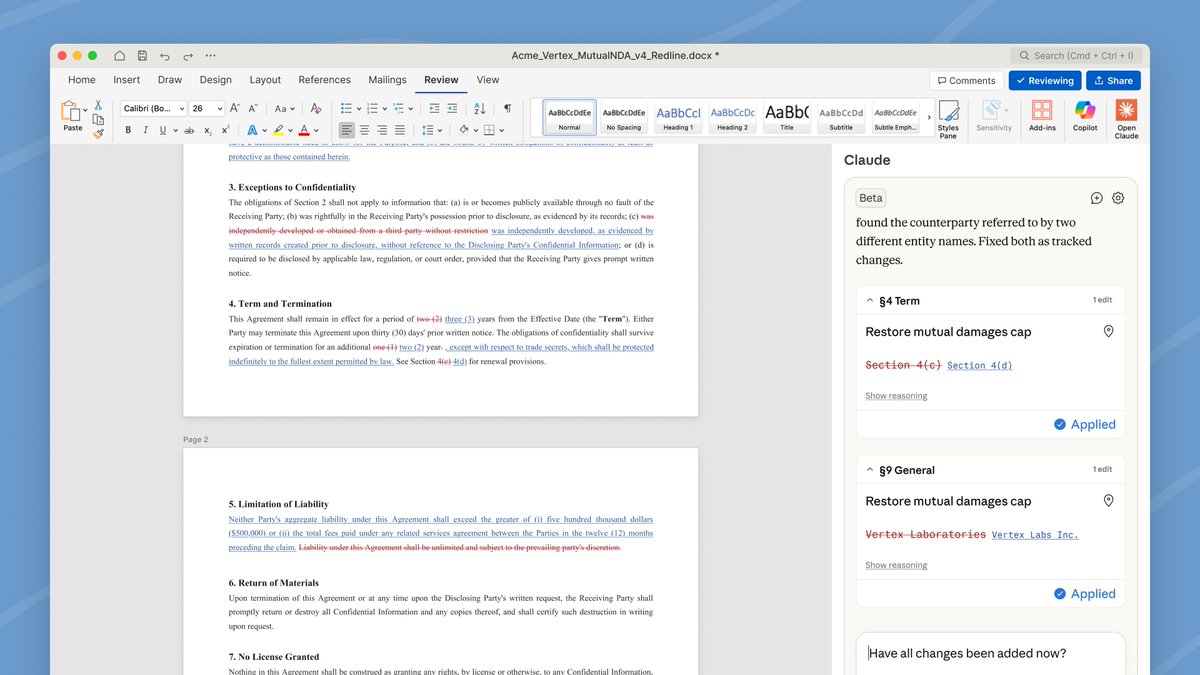
- Best for: Working across Word, Excel, and PowerPoint in a single conversation with shared context between documents
- When to use it: You need to draft, rewrite, or clean up a document and want edits shown as tracked changes you can accept or reject
- Who benefits: Team and Enterprise plan users. Not available on free or individual paid plans.
GooglepricingLyria 3 Pro Free Tier
Longer music tracks via Lyria 3 Pro now available to free Gemini users, previously limited to paid plans.

- Best for: Producing demo tracks, podcast intros, or background music without switching to a separate audio tool
- When to use it: You need a track longer than a short clip and want to experiment with styles and transitions before committing to a paid plan
- Who benefits: Creators and marketers on free Gemini plans who previously had to use paid subscriptions for anything beyond 30-second samples
OpenAIpricingChatGPT Pro $100 Tier
New mid-price Pro subscription at $100/month with 5x more Codex usage than Plus, positioned between Plus ($20) and the existing $200 Pro tier.
- Best for: Running back-to-back Codex sessions throughout the day without hitting rate limits
- When to use it: Plus throttling is slowing down your workflow but the $200 tier is more capacity than you need
- Who benefits: Individual developers and small teams using Codex as their primary coding tool, not occasional users
AnthropicfeatureClaude Cowork (Generally Available)
The feature that lets Claude work on tasks across your files and apps is now available on all paid plans.
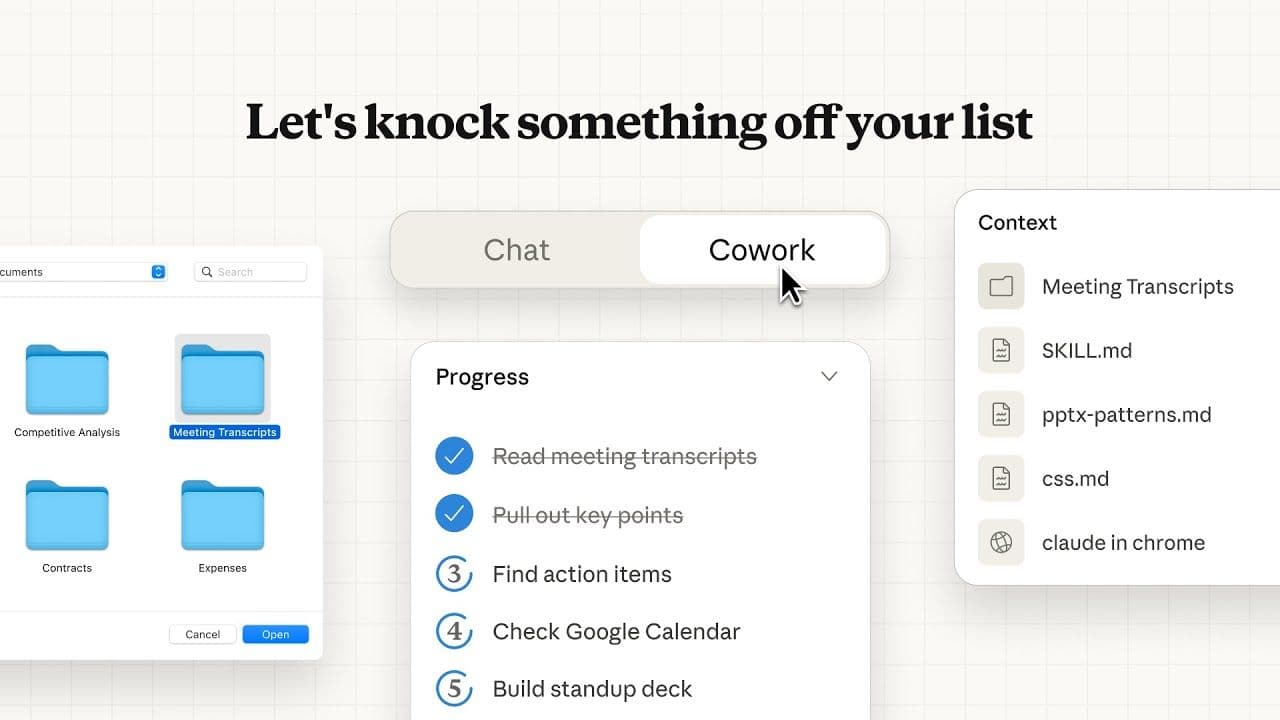
- Best for: Delegating multi-step knowledge work like creating charts, building presentations, analyzing spreadsheets, and managing tasks
- When to use it: You have work that spans multiple apps or files and want Claude to handle it end-to-end on your desktop
- Who benefits: Pro, Max, Team, and Enterprise subscribers on Claude Desktop for macOS and Windows
GooglefeatureGemini Interactive Simulations
Gemini can now generate interactive 3D models, simulations, and charts directly in the conversation.

- Best for: Exploring scientific concepts, data relationships, or spatial structures you can rotate and manipulate in real time
- When to use it: A static chart or image isn't enough and you need to interact with the visualization to understand it
- Who benefits: Students studying STEM subjects, educators building lesson materials, and analysts who think spatially
 Perplexityfeature
Perplexity Computer + Plaid
Perplexity Computer now connects to bank accounts, credit cards, and loans via Plaid. Track spending, build budget tools, and visualize net worth.

- Best for: Asking questions about your finances instead of manually building spreadsheets from bank exports
- When to use it: You want a consolidated view of spending, budgets, and net worth across multiple accounts in one place
- Who benefits: Pro and Max subscribers get full Computer tasks for automated analysis. Free users can link accounts and ask questions.
AnthropicapiAdvisor API
Pair Opus as an advisor with Sonnet or Haiku as the executor in your own agents via the API. Near Opus-level intelligence at a fraction of the cost.
- Best for: Production agents where most requests are routine but some require deeper reasoning to get right
- When to use it: Your agent's error rate on edge cases is too high with Sonnet alone, but running everything through Opus is too expensive
- Who benefits: Teams already building on the Claude API who want to improve agent quality without scaling their compute budget linearly
AnthropicfeatureRole-Based Access Controls
Enterprise admins can now organize users into groups and assign custom roles defining which Claude capabilities each member can access.
- Best for: Locking down which Claude features specific teams can access, like code execution, file uploads, or web search
- When to use it: Different departments need different permission levels and you can't give everyone the same access
- Who benefits: IT admins and security teams responsible for Claude governance across large organizations
GooglefeatureNotebooks in Gemini
Access your personal NotebookLM notebooks directly inside the Gemini app, and convert Gemini chats into grounded sources for new research.

- Best for: Grounding a Gemini conversation in your own research rather than starting from scratch every time
- When to use it: A Gemini chat produces insights you want to save as a citable source, or you need Gemini to pull from your existing research
- Who benefits: Ultra, Pro, and Plus subscribers on web. Not available on free plans or mobile yet.
AnthropicfeatureManaged Agents
Hosted agent infrastructure on the Claude Platform. Build and deploy long-running agents through the Console, Claude Code, or a new CLI.
- Best for: Shipping agents to production without building your own hosting, orchestration, and scaling infrastructure
- When to use it: Your agent works in development and you need it deployed and running for users without managing servers
- Who benefits: Development teams building on Claude who need production deployment, not just local prototyping
GooglemodelGemma 4
Google's latest open model family, available to run locally for privacy and self-hosting. Four variants from mobile-sized (2B) to frontier-level (31B).
- Best for: Running AI locally on your own hardware for privacy, cost savings, or offline use
- When to use it: You need an open-weight model you can self-host, fine-tune, or deploy on-device without API costs or usage restrictions
- Who benefits: Developers building on-device apps, researchers who need to modify model weights, and teams with privacy requirements that rule out cloud APIs
Join the newsletter to get ahead with AI.
I share strategies, new modules, free guides, and tools to get you better at using AI in your work.
Leading a team? See team programs →