






 Metafeature
Spaces in Muse
Describe a planner, tracker, or game and Muse builds it as a custom space inside the app that you can keep and edit.
- Best for: Building small personal or business tools inside Muse, like a planner, tracker, or order board.
- When to use it: When you keep recreating the same list or dashboard and want it to stay in your tabs.
- Who benefits: Muse users, including small businesses and freelancers.
MetamodelSpecialized Models in Muse and Meta AI
Meta is rolling out models trained using its frontier Muse Wonder model to people using Muse and Meta AI.
- Best for: Everyday and work tasks in Muse and Meta AI that need more than a quick answer.
- When to use it: Nothing to switch on. The new models are what Muse and Meta AI now use for complex tasks.
- Who benefits: Anyone using the Muse app or Meta AI, not just paying subscribers.
 Googlefeature
Flashcard Upgrades in Gemini Notebook
Flashcards in Gemini Notebook now show images, offer an optional stopwatch, and send study reminders on mobile. Small update.
- Best for: Studying from flashcards generated out of your own notes and sources.
- When to use it: When you want to test recall under time pressure or build a regular study habit.
- Who benefits: Students and anyone learning material in Gemini Notebook.
GooglefeatureAntigravity Voice Mode
Talk to Antigravity's coding agent out loud, powered by Gemini Live, in the Antigravity app and CLI.
- Best for: Steering a coding agent hands-free while it reads code, edits files, and runs commands.
- When to use it: When you want to brainstorm, guide a multi-step build, or approve actions without typing.
- Who benefits: Developers who use Antigravity and want to pair-program by voice.
GoogleapiGemini Embedding 2 Preview Deprecation
The preview embedding model now routes to the final gemini-embedding-2, so developers should update the model name. Developers only.
- Best for: Keeping search and retrieval apps on a supported embedding model.
- When to use it: If your code still calls gemini-embedding-2-preview.
- Who benefits: Developers building search or retrieval on the Gemini API.
 Anthropicfeature
Deny Instead of Prompting in Claude Code
A Claude Code setting that denies any action that would stop to ask permission, so automated runs keep going. Mostly for unattended setups.
- Best for: Running Claude Code without a person present to click approve.
- When to use it: When a scheduled or automated run would otherwise freeze on a permission question.
- Who benefits: Developers who run Claude Code in scripts, schedules, or with subagents and teammates.
AnthropicapiBackground MCP Tasks in Claude Code
Claude Code now runs long tool jobs from connected MCP servers in the background and reports back when they finish. Mostly matters to people using MCP servers.
- Best for: Keeping a Claude Code session moving while a slow connected tool finishes its job.
- When to use it: When an MCP server runs a tool call as a long task, such as a big export or build.
- Who benefits: Developers who connect Claude Code to MCP servers with slow tools.
AnthropicfeatureProject Tags for Spend in Claude Enterprise (Beta)
Claude Enterprise admins can tag projects with billing codes and see spend grouped by tag, in beta.
- Best for: Charging Claude usage back to clients, cost centers, or charge codes your company already uses.
- When to use it: When finance asks which client matter or cost code drove Claude spend.
- Who benefits: Finance and admin teams at Enterprise organizations that bill or budget by project code.
AnthropicfeatureEnvironment Setup for Claude Code Cloud Sessions
Claude Code cloud sessions can now work out and save the setup your repo needs, for Pro, Max, and Ultra users.
- Best for: Getting a repo running in a Claude Code cloud session without configuring the environment by hand.
- When to use it: The first time you point a cloud session at a repo that needs dependencies, network access, or API keys.
- Who benefits: Pro, Max, and Ultra users who run Claude Code in the cloud instead of on their own machine.
 Perplexityapi
Ultra Effort Level and Cheaper Agent API Effort Levels
Every preset effort level in Perplexity's Agent API now costs less per query, and a new ultra level runs several research agents at once, for developers.

- Best for: Deep web research run through the API where cost per query matters.
- When to use it: You call the Agent API by effort level and want the same quality for less, or need the most thorough research it offers.
- Who benefits: Developers building research and data products on Perplexity's API.
MetafeatureMuse in Mexico
Small update: Meta's Muse personal AI agent app is now available in Mexico.

- Best for: Using Muse as a personal agent for everyday planning and tasks.
- When to use it: You or your audience are in Mexico and were waiting on access.
- Who benefits: People in Mexico who want a personal AI agent, and brands tracking where Meta's agent is launching.
AnthropicfeaturePersonal Finance in Claude (Beta)
A read-only money hub in Claude that connects your bank and card accounts so you can ask questions about your spending, for Pro, Max, and Ultra users in the US.

- Best for: Seeing spending across several accounts in one place and getting plain answers about where the money went.
- When to use it: You want to catch duplicate charges, creeping bills, or category overspending without building a spreadsheet.
- Who benefits: Individual Claude subscribers in the US who manage their own household or freelance finances.
 OpenAImodel
GPT-6 Cyber
OpenAI's security research model for finding, exploiting, and patching software vulnerabilities, limited to approved Daybreak Red security customers.

- Best for: Finding, proving, and patching vulnerabilities in large codebases with an AI agent.
- When to use it: Your security team runs authorized testing and needs a model that builds working exploits instead of refusing.
- Who benefits: Security research and penetration testing teams, not marketing or general business users.
GooglemodelGemini Omni 1.2 Flash (Generally Available)
Google's updated video generation model, now generally available, with 15-second clips, editing by chat, and 30% lower pricing.

- Best for: Producing high volumes of short product videos, ads, and try-on clips that keep products and characters consistent.
- When to use it: You need a clip revised (swap the product, change the lighting or camera angle) without regenerating it from scratch.
- Who benefits: Performance marketing and creative ops teams producing video at scale.
PerplexityfeaturePerplexity Teammates
Long-running AI agents inside Perplexity Computer that own ongoing projects, follow up on their own, and take requests in Slack, for Max subscribers on the web.

- Best for: Handing an agent recurring work like campaign monitoring, pipeline follow-ups, or deadline chasing.
- When to use it: A task repeats or needs watching over days, rather than a one-off question.
- Who benefits: Marketing, sales, support, and ops leads who want an agent to own a workstream.
 Manusfeature
Manus Studio Export to Video Editors
Small update: Manus Studio video projects can now be exported to Premiere Pro, DaVinci Resolve, CapCut, or Final Cut Pro for finishing.

- Best for: Starting a video with AI in Manus and finishing it in a professional editor.
- When to use it: Your final cut, captions, or brand polish happen in an editor Manus doesn't replace.
- Who benefits: Video editors and content creators who already work in Premiere Pro, DaVinci Resolve, CapCut, or Final Cut Pro.
OpenAIapiPrivate Safety Processing
An OpenAI API option that runs safety review on related requests without keeping your prompts or responses. For companies with strict data rules.
- Best for: API customers who cannot let a vendor retain prompts and outputs.
- When to use it: Safety review is required for your use case but retaining your content is not allowed.
- Who benefits: Security and compliance teams at companies building on the OpenAI API.
MetafeatureVoice Conversations and Avatars in Muse
Talk to Muse out loud in real time, with an animated avatar that reacts as it listens and speaks. US only to start.
- Best for: Hands-free back-and-forth with Muse while you are walking or busy.
- When to use it: When talking is faster than typing, or you want Muse working in the background while you chat.
- Who benefits: Muse users in the US on mobile, web, and Mac.
GoogleapiOffice Files and Multimodal Tool Results in the Gemini API
Small developer update: the Gemini API now reads more Office and OpenDocument formats, and tools can hand files, audio, and video back to the model.
- Best for: Building agents that work over slide decks, spreadsheets, and older Word files.
- When to use it: Your app feeds PowerPoint or OpenDocument files to Gemini, or your tools return documents and media rather than plain text.
- Who benefits: Developers building document and file workflows on the Gemini API.
AnthropicfeatureClaude Enterprise Security Center and Admin Controls
A batch of security and admin tools for Claude Enterprise, including a settings health check, hooks that send prompts to your own security tools, and one console for companies with several Claude organizations.
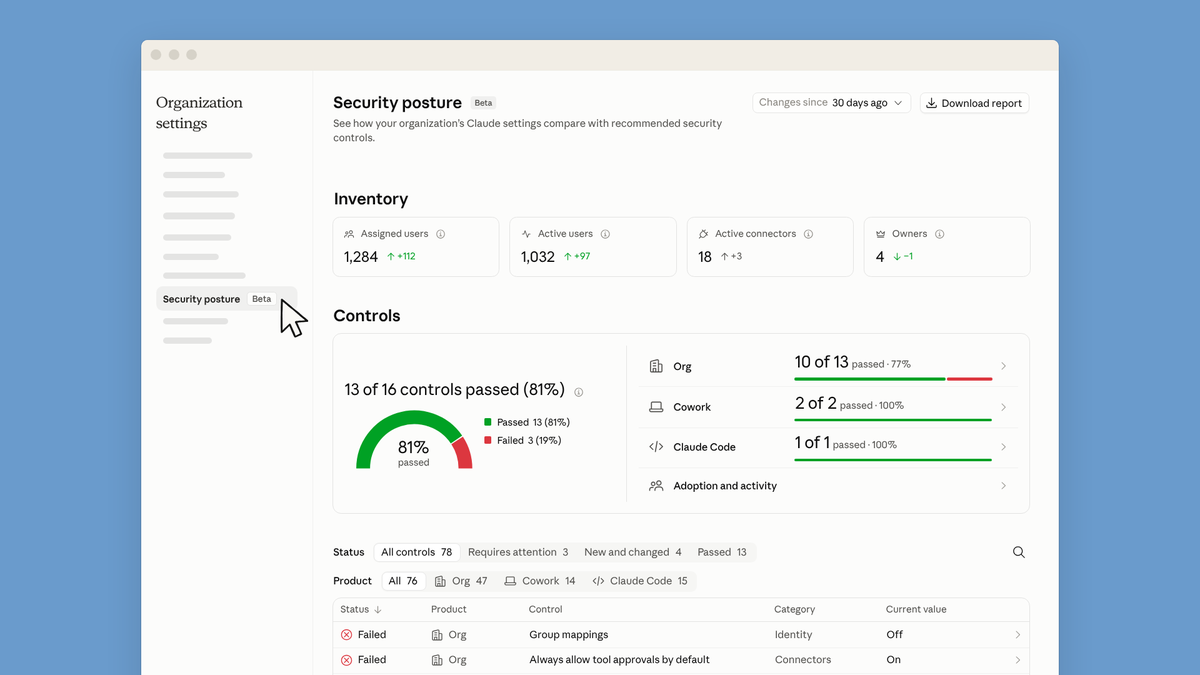
- Best for: Getting Claude through a security review and keeping its settings in line with company policy.
- When to use it: Your security or IT team needs proof of how Claude is configured before rolling it out wider.
- Who benefits: IT admins and security teams at companies on Claude Enterprise.
Join the newsletter to get ahead with AI.
I share strategies, new modules, free guides, and tools to get you better at using AI in your work.
Leading a team? See team programs →