






 Anthropicfeature
Claude Marketplace
A directory inside Claude where teams find connectors, Claude-powered agents, and consulting partners, and can pay for some of them out of existing Anthropic spend.
- Best for: Finding vetted add-ons for Claude in one place instead of hunting across vendor sites.
- When to use it: You're about to buy an AI tool or hire an implementation partner and your company already has an Anthropic contract.
- Who benefits: Ops leads and admins who approve and manage the tools their team connects to Claude.
 Googlefeature
Gemini Notebook as a Source in Google Docs
Gemini in Google Docs can now draw on your Gemini Notebook notebooks while you draft, in a beta a Workspace admin has to turn on.

- Best for: Turning research you've already gathered into a draft without re-pasting sources.
- When to use it: You've built a notebook of research for a campaign or brief and are ready to write the doc.
- Who benefits: Content strategists, planners, and anyone who writes proposals or briefs from a pile of research.
Googlefeature14 New Connected Apps in Gemini
The Gemini app can now work directly with 14 more outside apps, including Adobe, Airtable, Linear, monday.com, Squarespace, Webflow, and Peloton.

- Best for: Getting work done in other tools from inside a Gemini chat instead of switching tabs.
- When to use it: Your team already lives in one of these tools and you want Gemini to act in it, like editing a photo in Adobe or updating a board in monday.com.
- Who benefits: Marketers and small-business owners who juggle design, project management, and website tools.
GooglemodelGemini 3.8 Flash TTS and Flash-Lite TTS
Two new Google text-to-speech models that can design a custom voice from a written description or copy a real voice from a 30-second sample.

- Best for: Producing voiceovers, audio versions of content, and voice agents without booking voice talent.
- When to use it: You need one consistent branded voice across many audio assets, or a lot of narration fast.
- Who benefits: Content and video teams making podcasts, explainer videos, dubbed versions, or audio ads.
 OpenAIfeature
ChatGPT Ads (Southeast Asia and Taiwan)
OpenAI's ad product inside ChatGPT is rolling out to seven more Asian markets, bringing it to more than 60 countries.
- Best for: Reaching people while they research and compare options inside ChatGPT conversations.
- When to use it: Your brand sells into Southeast Asia or Taiwan and you are deciding where AI-search ad spend fits.
- Who benefits: Media and performance marketers, and agency teams planning APAC budgets.
 Microsoft Copilotfeature
Vision in Microsoft 365 Copilot (Screen Sharing and Camera)
Microsoft 365 Copilot can now look at your shared desktop screen or your phone's camera during a voice session and answer questions about what it sees.
- Best for: Getting a quick read on something visual, like a dashboard on screen or a printed document on your desk.
- When to use it: It is faster to show Copilot something than to describe it.
- Who benefits: People who move between dashboards, documents, and physical materials and want spoken answers on the go.
Microsoft CopilotfeaturePlanner Agent Chat
Microsoft Planner now has a built-in Copilot chat for asking about tasks and updating them in plain language.
- Best for: Checking and updating a project plan without clicking through filters and menus.
- When to use it: You need a quick answer, like which tasks are due this week, or want to update task status by just saying so.
- Who benefits: Managers and project leads who run team work in Planner.
Microsoft CopilotfeatureInbox Triage Actions for Copilot in Outlook
Copilot in Outlook can now delete, move, copy, and categorize emails and manage inbox rules and folders from a plain-language request.
- Best for: Clearing out and organizing a crowded inbox in bulk.
- When to use it: A cleanup job would take dozens of clicks, like filing every invoice email from one vendor.
- Who benefits: Microsoft 365 Copilot users who spend most of the day in Outlook.
Microsoft CopilotfeatureCopilot Chat in Microsoft Forms
The Copilot chat pane is now built into Microsoft Forms for users with a Microsoft 365 Copilot license, to improve forms, send invites, and analyze responses.
- Best for: Building a survey or quiz and making sense of the answers without leaving Forms.
- When to use it: You are running a survey and want help tightening the questions or summarizing the results.
- Who benefits: Marketing and research teams running customer, event, or internal surveys.
Microsoft CopilotfeatureCustom Skills in Copilot for PowerPoint
PowerPoint for the web users with Microsoft 365 Copilot can now create their own reusable Copilot skills for tasks they repeat.
- Best for: Repeat deck work, like restructuring slides or applying a house format the same way each time.
- When to use it: You keep typing the same instructions to Copilot in PowerPoint.
- Who benefits: Marketing and comms teams that build a lot of decks in a set format.
GoogleapiLocal Models in the Antigravity SDK
Developers can now run Antigravity SDK agents on their own machine with Gemma 4, offline and with no API fees.

- Best for: Agent workflows over code or data that should not leave the machine.
- When to use it: Privacy rules, API costs, or rate limits are blocking an agent workflow you want to run.
- Who benefits: Developers building on the Antigravity Python SDK who have a machine with a strong GPU.
 SpaceXAIfeature
Grok Bot and Connectors in Tesla
Tesla drivers can now use Grok by voice to work with their email, calendar, and files through Connectors, and hand off multi-step tasks to Grok Bot.
- Best for: Clearing small tasks like email, scheduling, and orders by voice during a drive.
- When to use it: Your commute is dead time and your inbox and calendar are already connected to Grok.
- Who benefits: Professionals who spend a lot of time in the car, like field sales reps or agency leads visiting clients.
SpaceXAIfeatureGoogle Docs, Sheets, and Slides Connectors for Grok Bot
Small update. Grok Bot, the Grok agent product, now connects directly to Google Slides, Sheets, and Docs.
- Best for: Letting Grok Bot work with the decks, spreadsheets, and docs your team already keeps in Google.
- When to use it: A Grok Bot task needs to pull from or deliver into a Google file instead of a chat reply.
- Who benefits: Teams running Grok Bot whose work lives in Google Workspace rather than Microsoft 365.
OpenAImodelGPT-6 Sol and Luna
Two faster, cheaper GPT-6 models trained with the same methods as GPT-6 Astra, at half the API price of the GPT-5.6 versions they replace.

- Best for: High-volume everyday work where Astra's full depth is overkill, like business workflows across apps, drafting, and coding at scale.
- When to use it: Cost or usage limits are your constraint. Pick Sol for harder work and Luna for the cheapest, fastest runs.
- Who benefits: Paid ChatGPT Work and Codex users, and developers running apps or agents on the OpenAI API.
AnthropicmodelClaude Opus 5.5
Anthropic's new top Opus model, performing at the level of Fable 5.1 for about 40% less per task than Opus 5, on all paid Claude plans and the API.

- Best for: Long, multi-step work you hand off whole, like agentic coding, computer use, and research-heavy knowledge work.
- When to use it: You were running big tasks on Fable 5.1 or Opus 5 and want the same quality faster and cheaper.
- Who benefits: Pro, Max, Team, and Enterprise users who hit usage limits, and developers paying per token on the API.
OpenAIapiBetter Prompt Caching for GPT-6
For developers on the OpenAI API: GPT-6 models reuse repeated prompt content more often, with new tools to see and fix what isn't being reused.
- Best for: Long-running agents that resend the same instructions, tool lists, and context on every request.
- When to use it: Your GPT-6 API bill or response times are climbing as agent sessions get longer.
- Who benefits: Developers and platform teams running agents on the OpenAI API at volume.
GooglefeatureInteractive Learning Overviews in Gemini Notebook
A Gemini Notebook report that pulls source summaries, quizzes, flashcards, and infographics into one interactive page, now available to all users.

- Best for: Getting up to speed on a new topic from a stack of documents in one place.
- When to use it: You've loaded sources into a notebook and want the summary and review material together instead of across separate screens.
- Who benefits: Marketers onboarding to a new product, market, or client who need to learn source material fast.
 Perplexityfeature
Video Generation in Perplexity Computer
Perplexity Computer can now make finished video clips using MiniMax H3 and ByteDance Seedance 2.5, for Pro and Max subscribers.

- Best for: Producing a campaign clip, product demo, or social video in the same thread as the copy and images that go with it.
- When to use it: You need a short finished video alongside other launch assets and don't want to jump to a separate video tool.
- Who benefits: Social and content marketers producing campaign assets on a small team.
SpaceXAImodelGrok 4.7
SpaceXAI's newest model for coding and knowledge work, replacing Grok 4.6 at the same price and speed, available in Cursor, Grok Build, and the Grok API.
- Best for: Long coding tasks and multi-hour office work like building documents and presentations.
- When to use it: You already run Grok 4.6 in Cursor, Grok Build, or the API and want better results without paying more.
- Who benefits: Developers and technical marketers building agents or automations on the Grok API.
GooglefeatureLive Chat in Gemini Notebook
Real-time voice conversations with your notebook's sources in the Gemini Notebook mobile app, now fully rolled out to Google AI Ultra subscribers.
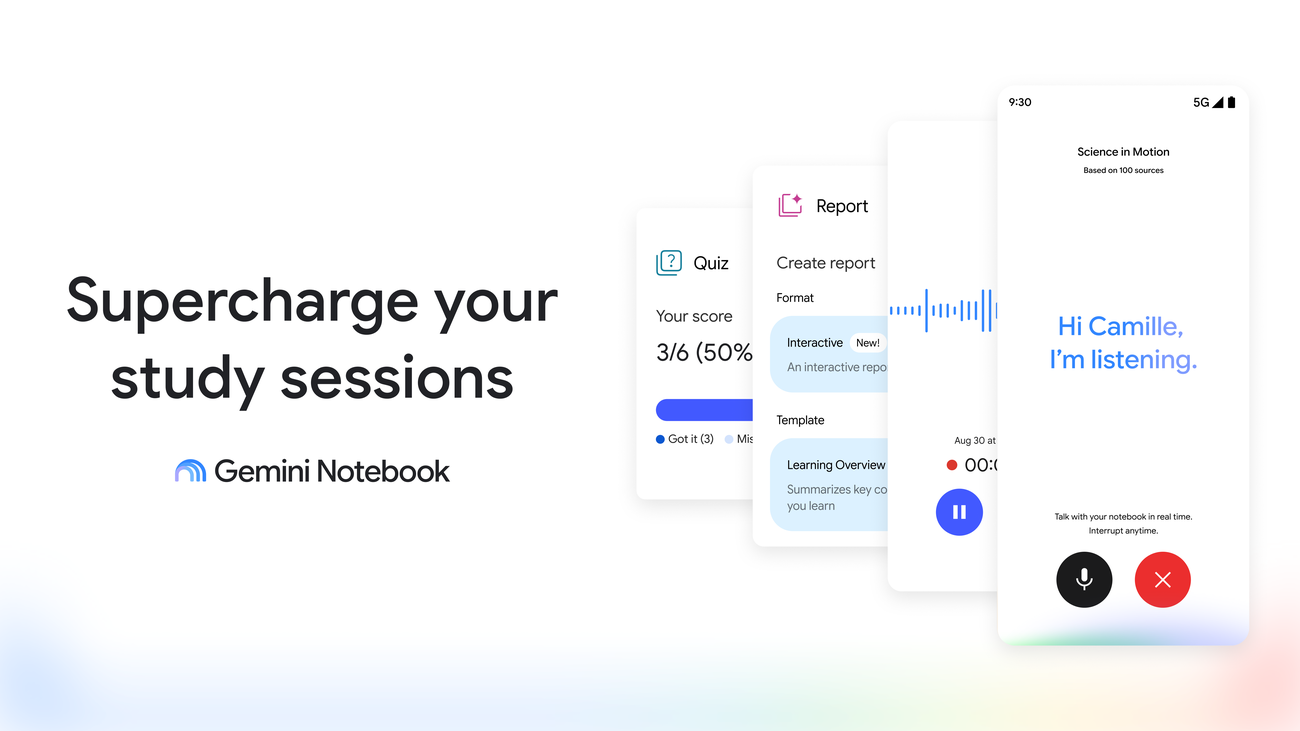
- Best for: Talking through research or source documents out loud and getting answers drawn only from what you uploaded.
- When to use it: You're away from a keyboard, like commuting or walking between meetings, and want to review a notebook by voice.
- Who benefits: Google AI Ultra subscribers who keep briefs, research, or client material in Gemini Notebook.
Join the newsletter to get ahead with AI.
I share strategies, new modules, free guides, and tools to get you better at using AI in your work.
Leading a team? See team programs →