






 Anthropicfeature
iPhone Duo Testing in Claude Code Desktop (Public Beta)
Claude Code on desktop can now run your iOS app on a simulated iPhone Duo and fold it into each pose to test layouts, for Mac users with Xcode 27.1 or later.
- Best for: Checking how an iOS app lays out on a foldable iPhone without owning the device
- When to use it: You are adapting an existing app for the iPhone Duo or building a new screen that has to work closed, half open, and open
- Who benefits: iOS developers using Claude Code Desktop on a Mac
AnthropicfeatureCustom Themes for Claude Code Desktop
Claude Code on desktop can now be restyled with custom themes built through mods, including new colors and an animated background.

- Best for: Making the Claude Code desktop app look the way you want
- When to use it: You spend long stretches in the desktop app and want a different color scheme or animated backdrop
- Who benefits: Claude Code desktop users who like to customize their workspace
AnthropicfeatureProjects Updates in Claude Code
Projects in Claude Code now has a more proactive coordinator that answers your questions and reports on your running threads, for Claude Code users.
- Best for: Running several related coding tasks in parallel under one project
- When to use it: You have multiple threads going and want a status check without opening each one
- Who benefits: Developers who keep several Claude Code tasks moving at the same time
 Googlefeature
Antigravity Orchestrator Mode
Google Antigravity now has an Orchestrator mode that pairs a larger Gemini 4 model with Gemini 4 Hydrogen in one session, for Antigravity users.

- Best for: Coding sessions with many small edits where a heavy model on every step is wasteful
- When to use it: You want a strong model to plan the work and a faster one to carry it out
- Who benefits: Developers working in Antigravity who watch their usage quota
 Perplexityfeature
Perplexity Teammates in Mac App
Perplexity's Teammates, long-running AI agents that take on ongoing work, now run in the Perplexity Mac app for Max subscribers.

- Best for: Handing recurring work like QA, customer service, research, or growth marketing to an agent from the desktop
- When to use it: You already use Teammates on the web and want them in the Mac app
- Who benefits: Perplexity Max subscribers on Mac
AnthropicfeatureConsole Sign-In for Claude Code in VS Code
Small update. VS Code users can sign in to Claude Code with a Console account without creating an API key. Most users won't notice.
- Best for: Signing in to Claude Code in VS Code with a Console account
- When to use it: You have a Console account and don't want to generate and paste an API key
- Who benefits: Claude Code users on the VS Code extension who sign in through the Console
GooglefeatureAgent Observability in BigQuery and Looker
Logs and dashboards that show what AI agents did, what data they touched, and what they cost, for data and platform teams on Google Cloud.
- Best for: Tracking an AI agent's reasoning, data access, and cost across BigQuery and Looker
- When to use it: You run conversational analytics agents or custom agents and need to see what they are doing and spending
- Who benefits: Data and platform teams responsible for AI agents on Google Cloud
 OpenAIfeature
ChatGPT Wallet
A payment feature that lets AI agents buy things for you without seeing your real card number, starting in dots for ChatGPT Pro users in the US.
- Best for: Letting an agent finish an online purchase while you approve each one
- When to use it: You want an agent to complete the buy, not stop at the checkout page
- Who benefits: ChatGPT Pro subscribers in the US, and online businesses preparing for agent shoppers
 Manusfeature
Manus Side Chat
Manus now lets you ask side questions in a chat that runs next to your main task and keeps the main thread clean.
- Best for: Asking quick questions while a longer Manus task is running
- When to use it: You need a clarification or a related answer but don't want it cluttering the task's thread
- Who benefits: Manus users who run long tasks and think of questions along the way
AnthropicfeatureClaude Meetings (Beta)
Add Claude to a Google Meet call as a visible participant that takes notes, answers questions, and builds docs, whiteboards, and slides while you talk.

- Best for: Meetings where the end product is a doc, whiteboard, or slide deck, so a draft exists before the call ends.
- When to use it: Planning sessions, brainstorms, and debriefs where someone usually has to write everything up afterward.
- Who benefits: Team and Enterprise plan members who run recurring internal meetings, such as marketing leads and project managers.
Perplexityapipplx-decider v1.3
New open-weight Perplexity models that answer yes/no, multiple-choice, and scored questions about text, now with a feature that pulls exact passages out of the input.
- Best for: High-volume labeling, routing, and filtering, plus pulling names or personal details out of text.
- When to use it: You need a low-cost classifier for thousands of items instead of calling a general chat model each time.
- Who benefits: Developers and data teams building on the Perplexity Decisions API.
 SpaceXAIfeature
Apple Apps on Mac in Grok Bot
Grok Bot on Mac can now use Messages, Mail, Notes, Reminders, Calendar, Location, and Contacts.
- Best for: Delegating everyday tasks that live in your Mac's built-in apps, like email, calendar, and reminders.
- When to use it: The work spans your messages, mail, and calendar and you want the Bot to handle it from your Mac.
- Who benefits: Grok Bot users on Mac.
GooglemodelGemini 4 Hydrogen
A faster Gemini 4 model for everyday coding and agent workflows, now in the Gemini app and generally available in the Gemini API.
- Best for: Everyday coding, following instructions closely, and calling the right tools with less back-and-forth.
- When to use it: You want Gemini 4 speed and efficiency for routine work, and save Carbon for the hardest problems.
- Who benefits: Gemini app users on the free tier, developers on the Gemini API, and teams building agents.
AnthropicapiSelf-Hosted Claude Managed Agents (Private Beta)
Run the full Claude Managed Agents service in your own cloud or on-premises, for teams whose code and data cannot leave their environment.

- Best for: Running agents against internal code and systems without moving credentials, files, or session history to a hosted service.
- When to use it: Security rules block hosted agents, or the work touches code that has to stay inside your network, like fixing broken builds or triaging alerts.
- Who benefits: Engineering and security teams at larger organizations that already work with an Anthropic account team.
 Metafeature
Outbound Calling in Muse
Muse can now make phone calls on your behalf to handle wait times, for paid subscribers in the US.
- Best for: Handing off phone calls that are mostly waiting, so you get the time back.
- When to use it: You have a call to make and expect to spend a long time waiting on it.
- Who benefits: Paid Muse subscribers in the US.
GoogleapiOrganization Policy MCP Server (Generally Available)
Google Cloud's Organization Policy now has a server that lets AI agents check and manage security guardrails, plus Gemini-written custom rules, for cloud platform and security teams.
- Best for: Auditing and managing Google Cloud guardrails through an AI agent or in plain English
- When to use it: You want to check whether a change is compliant before making it, or write a custom rule without learning the rule syntax
- Who benefits: Cloud platform and security teams that set and audit Google Cloud policy
AnthropicmodelClaude Opus 5.5 as Default Model
Opus 5.5 is now the default model in Claude on Pro, Max, Ultra, and Team plans.
- Best for: Everyday knowledge work such as documents, spreadsheets, financial analysis, and long multi-part tasks.
- When to use it: You start a new chat in Claude and want to know which model you are on without opening the model picker.
- Who benefits: Pro, Max, Ultra, and Team plan users, especially those who build reports and models.
AnthropicfeatureCode Mode in Claude Code (Experimental)
An opt-in experimental mode where Claude writes JavaScript to call its tools, for Claude Code users who want to try it.
- Best for: Claude Code users who want to test a different way for Claude to work with its tools.
- When to use it: You are comfortable with experimental features and want to compare it against the default behavior.
- Who benefits: Developers on Claude Code, and organizations that can switch it on or off for their whole team.
AnthropicfeatureClaude for Manufacturing
A Claude plugin for plant teams that drafts quotes, quality reports, and supplier requests from the records a manufacturer already keeps.
- Best for: Quoting new jobs, investigating failed inspections, diagnosing breakdowns, and comparing supplier bids.
- When to use it: Paperwork-heavy steps where a person still reviews the draft before it goes to a customer or supplier.
- Who benefits: Estimators, quality engineers, technicians, buyers, planners, design engineers, and plant managers.
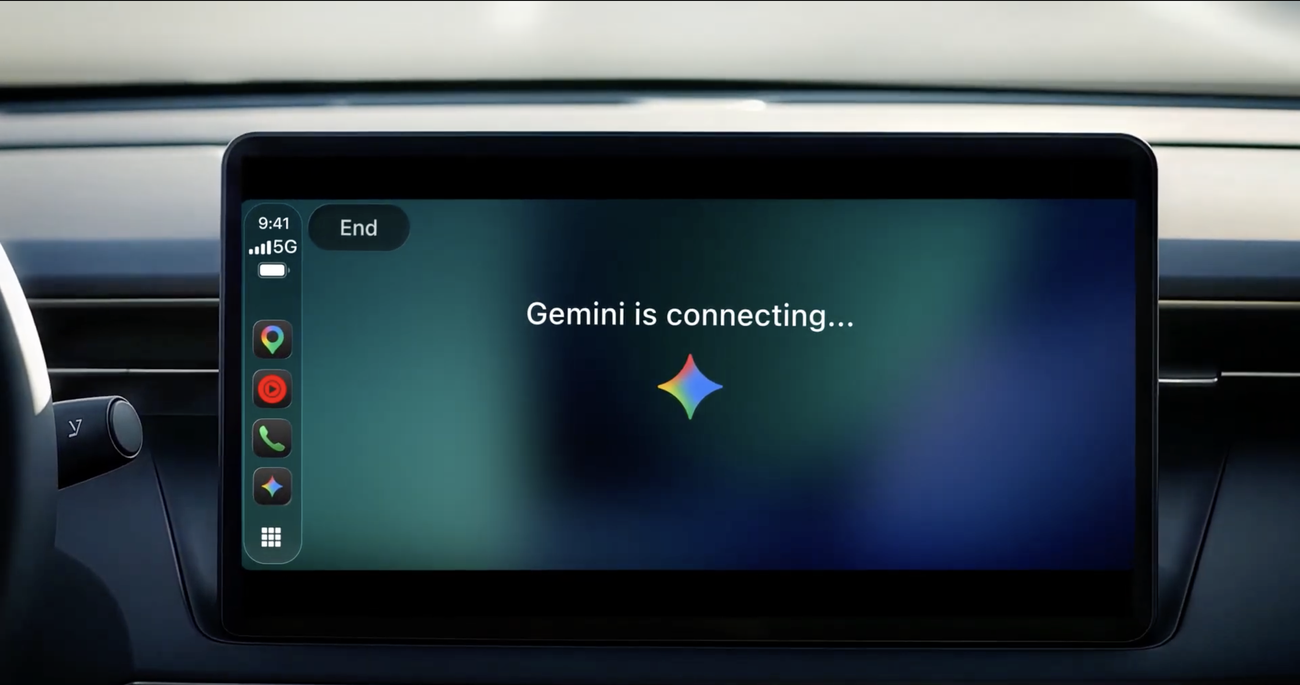
GooglefeatureGemini on Apple CarPlay
Gemini Live now works from the CarPlay screen for iPhone users, so you can talk to Gemini hands-free while driving.
- Best for: Using a commute to prep for meetings, catch up on email, or talk through an idea out loud.
- When to use it: Any time you are driving with your iPhone connected to CarPlay and want to keep your hands on the wheel.
- Who benefits: Managers and client-facing marketers who spend real time in the car between meetings.
Join the newsletter to get ahead with AI.
I share strategies, new modules, free guides, and tools to get you better at using AI in your work.
Leading a team? See team programs →