The #1 source of AI burnout is checking and fixing what AI gives you.
That surprised me.
It beat people's uncertainty about their job or career and the fear of falling behind. |
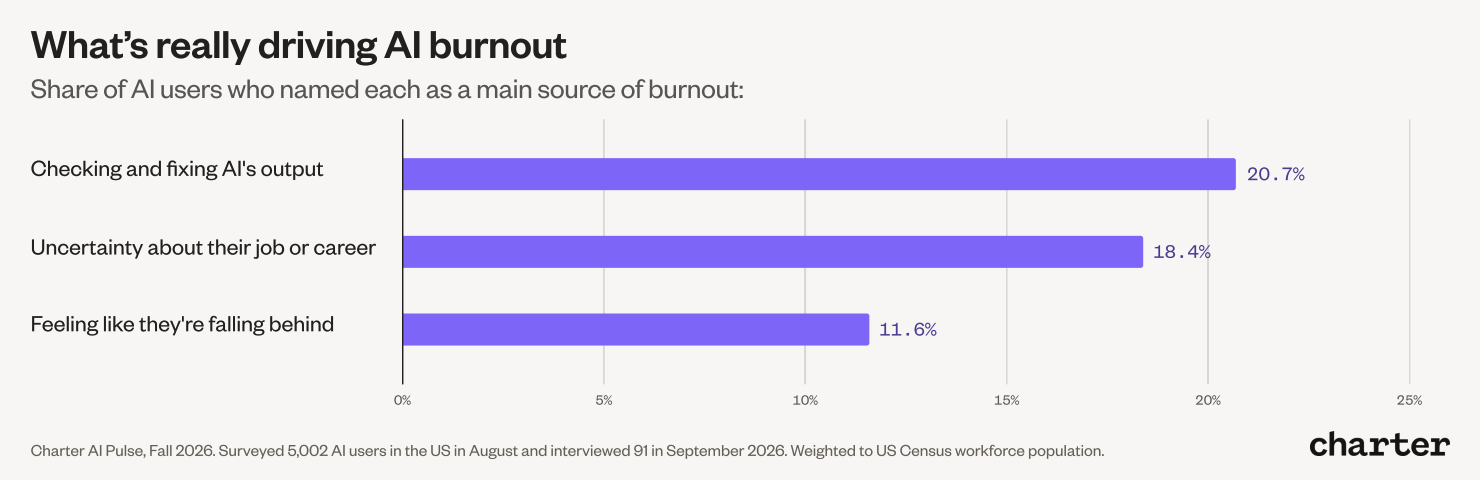 Charter AI Pulse, Fall 2026 |
If you're frustrated by how much time goes into checking and editing AI's work, here's what I'd do: |
Give AI what it needs to get closer the first time.
|
When AI’s output misses, it’s usually because it’s guessing things I never told it.
Like the format I wanted, the voice to write in, data it was supposed to pull or verify…
The fix is giving that information up front and getting it to adjust as you use it.
For me, that comes down to five things: |
1. Instructions
|
Tell AI what the finished output should look like (steps, format, what to include and skip).
Without that, AI doesn't have a clear picture of what you want. So it makes assumptions and tries its best with the info it has.
It’s helpful to save instructions for work you repeat, so you're not re-explaining them every time you do the task.
Tip: You don't have to write instructions yourself. I usually tell AI what I want, have it ask me questions to get more clarity, have it make its own suggestions, then ask it to write a prompt for me to run in a new window. |
2. Context
|
Instructions tell AI how to do the work. Context is the background information it has access to, like your goals, audience, priorities, voice, the details of the project, etc.
That could mean giving it access to your strategy deck. Or having AI scan your website or report and turn it into a shorter doc with key points you feed it.
Tip: Ask AI "what would help you do this well that I haven't given you?" then give it the context it needs to deliver. |
3. Examples
|
If your work has a set format, show AI what good results look like. Feed it 3-5 past versions you were happy with so it can reference them.
I find people often give one example (which tunes the output too closely to it) or too many (AI can’t tell what’s important).
Tip: Your examples drive the results, so pick good ones. If you give a mediocre example, AI will aim for that mediocre result. Tell it what's good about each one and what to take from it, like the structure, its tone, or how the takeaways were written. |
4. Evals
|
Evaluations are how AI builders test whether an output is good enough to use.
For the rest of us, it helps to add similar pass/fail criteria to your instructions. Or run the output through a second prompt that checks it against your criteria and adjusts it.
If you keep revising the same kinds of things, set up a check so AI catches them before you do.
Tip: Have AI flag what it isn't sure about by adding a line like "list anything you couldn't verify or had to guess" to your instructions. |
5. Feedback
|
If something's off, fix it so it’ll get better next time. Update your instructions, context, examples, or adjust your eval checks.
You can also have AI keep a log of your adjustments that it reads every time it does the task. That way it gets better over time, and you're not making all the edits by hand.
Tip: Feed it the good results too. When an output comes out the way you want, add it to your examples so the next one has a better target. |
Structure work you repeat.
|
Setting up everything above only to use it once would be a lot of work.
The only way this will curb burnout is if you apply it to tasks you do a lot.
From there, package up the info AI needs and put it somewhere it can easily be reused.
That way, you save time on both setup and review.
Every major platform has features for this: |
| Platform |
Where to set it up |
| Claude |
Keep context: Projects, Memory
Repeat tasks: Skills
Run on their own: Scheduled tasks
Always-on agent: Claude Duet (waitlist) |
| ChatGPT |
Keep context: Projects, Memory + custom instructions
Repeat tasks: Skills (inside plugins)
Run on their own: Scheduled tasks
Always-on agent: dots |
| Gemini |
Keep context: Gemini Notebook (formerly NotebookLM)
Repeat tasks: Skills
Run on their own: Scheduled actions |
| Copilot |
Keep context: Notebooks, Pages
Repeat tasks: Agents, Skills
Run on their own: Scheduled prompts |
| Grok |
Keep context: Projects, Memory + custom instructions
Repeat tasks: Skills
Run on their own: Automations
Always-on agent: Grok Bot |
|
Bonus: try one of the new always-on agents.
|
Most of the major platforms are rolling out a new kind of agent.
They connect to your apps, help with tasks and check with you before they act.
What I've noticed most is how fast they learn.
They pick up your instructions, context and examples as you talk, so results get better and there's less to review.
If you make one move from this, try one: Grok Bot, ChatGPT's dots, Claude Duet or Meta's Muse. |
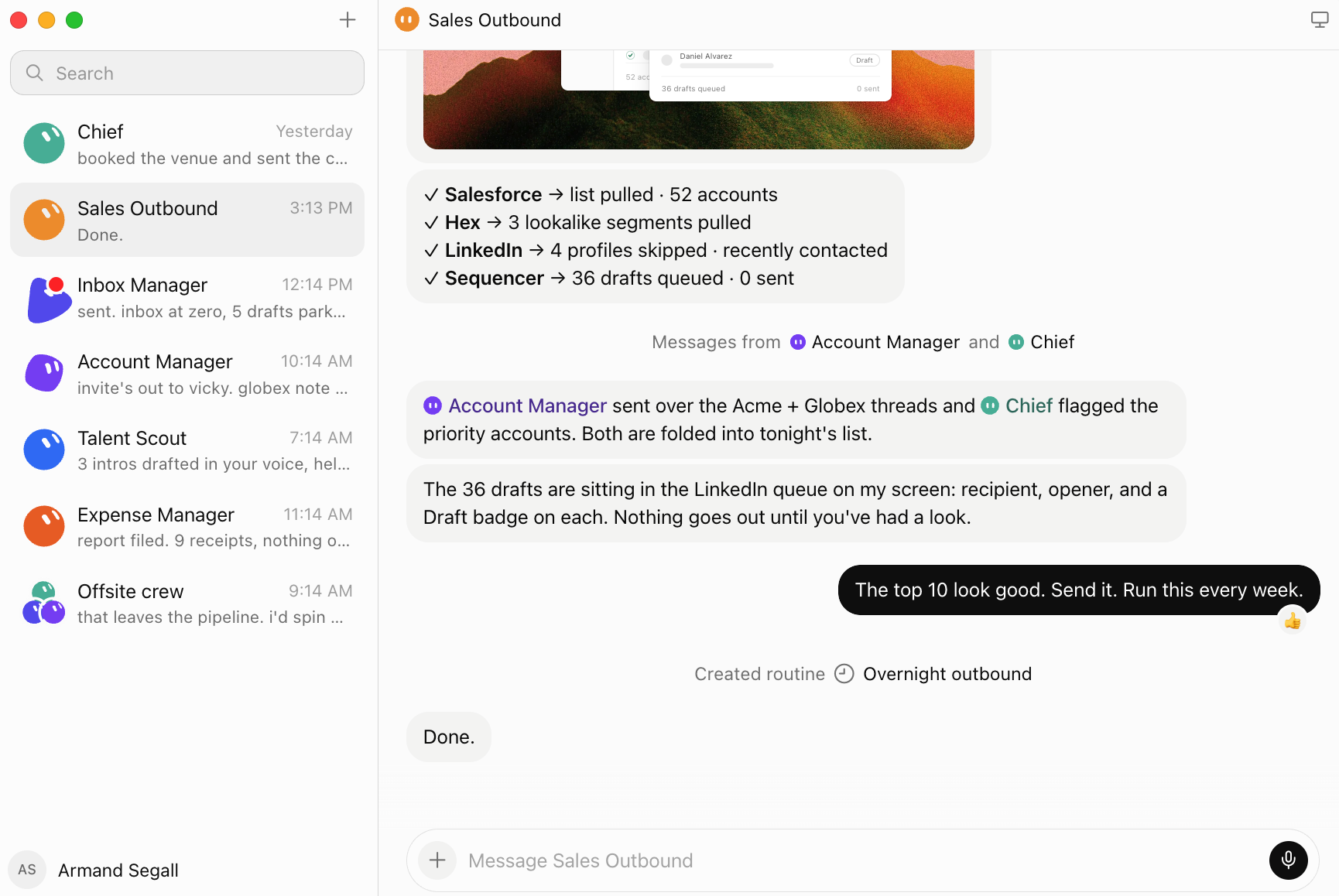 Grok Bot interface learns as you go. SpaceXAI |
Here's what it looks like for me.
|
I started with Projects, then I graduated to Skills because they were more consistent.
The Skill I use most is my business's right hand.
It knows my strategy and priorities, logs every session, links to my to-do list and knows what I'm working on with my platform and clients.
When I give it feedback, it asks if I want it remembered for next time.
Because it stays close to my business and learns as we go, I trust it more and check it less.
Lately, I've been shifting my daily tasks to the new always-on agents.
A few things I use Grok Bot for are lead sourcing, building cold email campaigns, and triaging my inbox.
My more fluid work still lives in my Claude Skill, but the daily tasks run better in Grok Bot.
There's less to manage, and it's easy to see what needs my attention, which keeps me on top of it. |
The way to spend less time checking is to spend time on setup.
|
Use the features built to help and tune it as you go.
Even then, your results won’t be perfect every time.
Expect some review and iteration. That's a good thing.
You're still the one standing behind the work and making it happen.
- Riley |
|
|
|
|