






 Anthropicpricing
50% Off Usage for Docs, Decks, and Designs in Claude (Temporary)
Through October 15, Claude chats and Cowork tasks that start a document, presentation, or design use half as much of your five-hour limit, for Pro, Max, and Team plans.
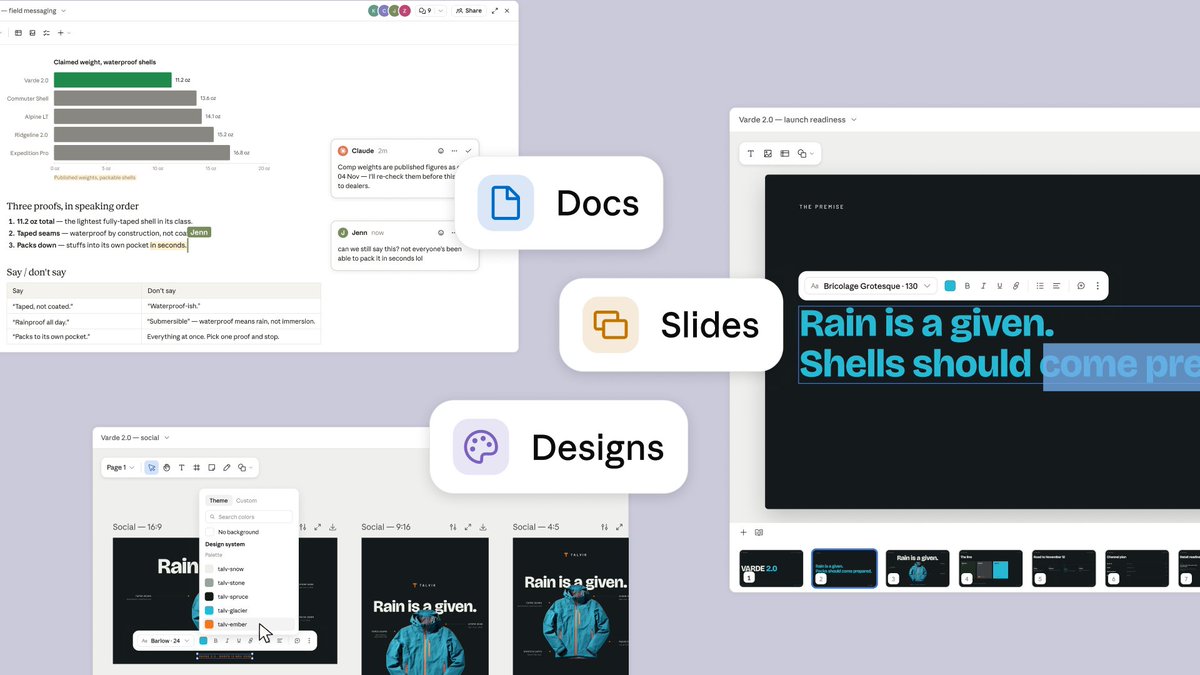
- Best for: Building slide decks, documents, and designs in Claude without burning through your session limit
- When to use it: You have a deck or doc you've been putting off and can draft it in Claude before October 15
- Who benefits: Marketers on Pro, Max, or Team plans who make presentations and one-pagers
AnthropicfeatureClaude Code Mods
Small TypeScript add-ons that change how Claude Code behaves and looks, for Claude Code users in the terminal or desktop app.

- Best for: Adding team guardrails or custom panels to Claude Code without waiting for Anthropic to build them
- When to use it: You keep wishing Claude Code warned you about, showed you, or blocked something it doesn't today
- Who benefits: Teams that standardize how they use Claude Code, and whoever sets up their tooling
 SpaceXAIfeature
Proactive Suggestions in Grok Bot
Your primary Grok Bot now spots work it could take off your plate and offers to do it, for Grok Bot users.
- Best for: Finding tasks to hand to Grok Bot when you haven't thought to ask
- When to use it: You set up Grok Bot but rarely remember to give it work
- Who benefits: Busy managers and solo operators who use Grok Bot as a teammate
 Perplexityfeature
Interactive Charts in Perplexity Computer
Small update. Perplexity Computer now draws interactive charts inside the conversation, for Perplexity Computer users.

- Best for: Seeing trends in the data Computer pulls up without exporting it to a spreadsheet
- When to use it: You ask Computer for numbers over time, like stock moves or performance data, and want the shape at a glance
- Who benefits: Analysts and marketers who pull market or performance data through Perplexity
 Microsoft Copilotfeature
Model Upgrade Grace Period in Copilot Studio
When Copilot Studio moves agents to a new default AI model, your agent can stay on its current model for up to 30 days.
- Best for: Testing an agent on the new default model before it switches over
- Use it when: Copilot Studio announces a default model upgrade and your agent's answers need to stay consistent
- Who benefits: Makers and admins running production agents in Copilot Studio
Microsoft CopilotfeaturePrivacy Statement Link for Copilot Studio Agents (Preview)
Small update. Admins can show a link to the organization's privacy policy at the start of every Copilot Studio agent conversation in an environment. Preview, text agents only.
- Best for: Agents that talk to customers or employees who need a pointer to your privacy policy.
- When to use it: Legal or compliance requires a privacy notice before anyone chats with an agent.
- Who benefits: Power Platform admins and compliance teams.
Microsoft CopilotmodelClaude Opus 4.8 and GPT Chat Latest in Copilot Studio
Claude Opus 4.8 is generally available for Copilot Studio agents on the standard harness, and agents now default to GPT Chat Latest, which follows the newest GPT chat model as older ones retire.
- Best for: Agents that reason through multistep tasks or long documents (Opus 4.8), and agents that should stay on a current GPT model without manual swaps.
- When to use it: Your agent's model is on the retirement list, or it needs deeper reasoning than a general chat model gives.
- Who benefits: Makers maintaining production agents on the standard harness.
Microsoft CopilotfeatureOneDrive for Business Knowledge in Copilot Studio
Agents on Copilot Studio's newer harness can use OneDrive for Business files as knowledge, and the Add knowledge dialog now suggests sources to start from.
- Best for: Agents that answer from documents kept in personal or shared OneDrive folders.
- When to use it: The files your agent needs live in OneDrive rather than on a SharePoint site.
- Who benefits: Makers and small teams whose working files sit in OneDrive.
Microsoft CopilotfeatureKnowledge Source Controls for Copilot Studio Admins
Small update. Admins can now block Copilot Studio makers from adding local file uploads, SharePoint and OneDrive, or public websites as agent knowledge, each on its own.
- Best for: Keeping agents grounded only in data the organization has approved.
- When to use it: Policy says agents shouldn't pull from public websites or from files people upload.
- Who benefits: Power Platform and IT admins.
Microsoft CopilotfeatureConnect Foundry, Agents SDK, and A2A Agents in Copilot Studio
Agents on Copilot Studio's newer harness can now hand work to agents built outside Copilot Studio: Microsoft Foundry agents, Microsoft 365 Agents SDK agents, and any agent that supports the A2A protocol (A2A in preview).
- Best for: One front-door agent that routes requests to specialist agents owned by different teams.
- When to use it: The specialist agent already exists on another platform and you don't want to rebuild it in Copilot Studio.
- Who benefits: Organizations with agents spread across Copilot Studio, Foundry, and custom code.
Microsoft CopilotfeatureShare and Browse Skills in Copilot Studio (Preview)
Copilot Studio makers can now share the skills they build with specific people or groups, and browse skills others shared to add to their own agents. Preview.
- Best for: Reusing a well-tuned set of instructions across a team's agents instead of rewriting it.
- When to use it: Someone on the team already built a skill that does the job, like a brand voice check or a report format.
- Who benefits: Teams with several people building agents in the same organization.
Microsoft CopilotfeatureUpgrade Agents to the Microsoft Copilot Harness (Preview)
Ask Copilot Studio in plain language to copy an older agent onto its newer agent engine, and it rebuilds what it can and reports what it couldn't. Preview.
- Best for: Moving existing agents onto the harness that gets new features like triggers, agent accounts, and shared skills.
- When to use it: You have agents on the standard harness and don't want to rebuild them by hand.
- Who benefits: Makers who own a set of older Copilot Studio agents.
Microsoft CopilotapiMCP and A2A Channels for Copilot Studio Agents (Preview)
Publish a Copilot Studio agent so other AI tools and agents can call it, with every request signed in as a real user. Preview, early release environments only, and setup needs an Entra app registration.
- Best for: Making one agent reusable from coding tools, other agent platforms, and orchestrators.
- When to use it: A Copilot Studio agent already does a job well and tools or agents outside Studio need to call it.
- Who benefits: IT and developer teams connecting agents across platforms.
 Manusfeature
Manus Game Dev
A Manus 2.0 feature for building and customizing browser games without writing code, starting from a template or a description.

- Best for: Making a playable game or interactive demo from a plain-language idea, like a racing game or platformer.
- When to use it: You want something people can play and share from a link, and nobody on the team writes game code.
- Who benefits: Non-developers such as marketers building branded games or interactive campaign pieces.
 Metafeature
Vim Mode in Muse Code
Small update. You can now edit prompts in Muse Code, Meta's coding agent, with Vim keyboard shortcuts. Only matters if you already use Vim.
- Best for: Editing long prompts from the keyboard without reaching for the mouse
- When to use it: Your hands already know Vim keys and switching habits slows you down in the prompt box
- Who benefits: Developers on Muse Code who work in Vim or Vim-style editors
 Googlemodel
Gemini 4 Argon
Google's new frontier model for long, multi-step work. Today it is limited to a small group of security teams, with paid API customers and AI Ultra subscribers next.

- Best for: Long, multi-step work like large codebases, legal and finance analysis, and reports that run far longer than a normal response.
- When to use it: Once it reaches the API or AI Ultra, try it on tasks where current Gemini models lose the thread partway through or cut off long outputs.
- Who benefits: Developers on paid Gemini API plans and Google AI Ultra subscribers. Most marketing teams will wait for the wider rollout.
GooglefeatureSkills in Gemini
Saved, reusable instructions in the Gemini app that you call with a slash command. Rolling out to personal Google accounts for users 18 and older, and replacing Gems.
- Best for: Tasks you ask Gemini for over and over, like outlining slides, matching your writing style, or brainstorming angles on a topic.
- When to use it: Any time you catch yourself pasting the same long prompt into a fresh chat.
- Who benefits: Individual Gemini users on personal accounts who rely on Gems or a doc full of saved prompts.
Microsoft CopilotfeaturePlugin Registry for Microsoft Copilot
One catalog where people find their company's approved plugins across Copilot, Word, Excel, PowerPoint, and SharePoint, and where IT approves or blocks them. Rolling out now.
- Best for: Finding and adding approved add-ons like HubSpot or Notion to Copilot.
- When to use it: You want Copilot to work with a tool your team already uses and need to know if IT has approved it.
- Who benefits: Admins deciding what connects to Copilot, and employees looking for approved integrations.
GoogleapiGoogle Cloud CLI Remote MCP Server (Preview)
A hosted connection that lets AI agents run Google Cloud and BigQuery command-line tasks without installing anything, for teams whose agents work inside Google Cloud.
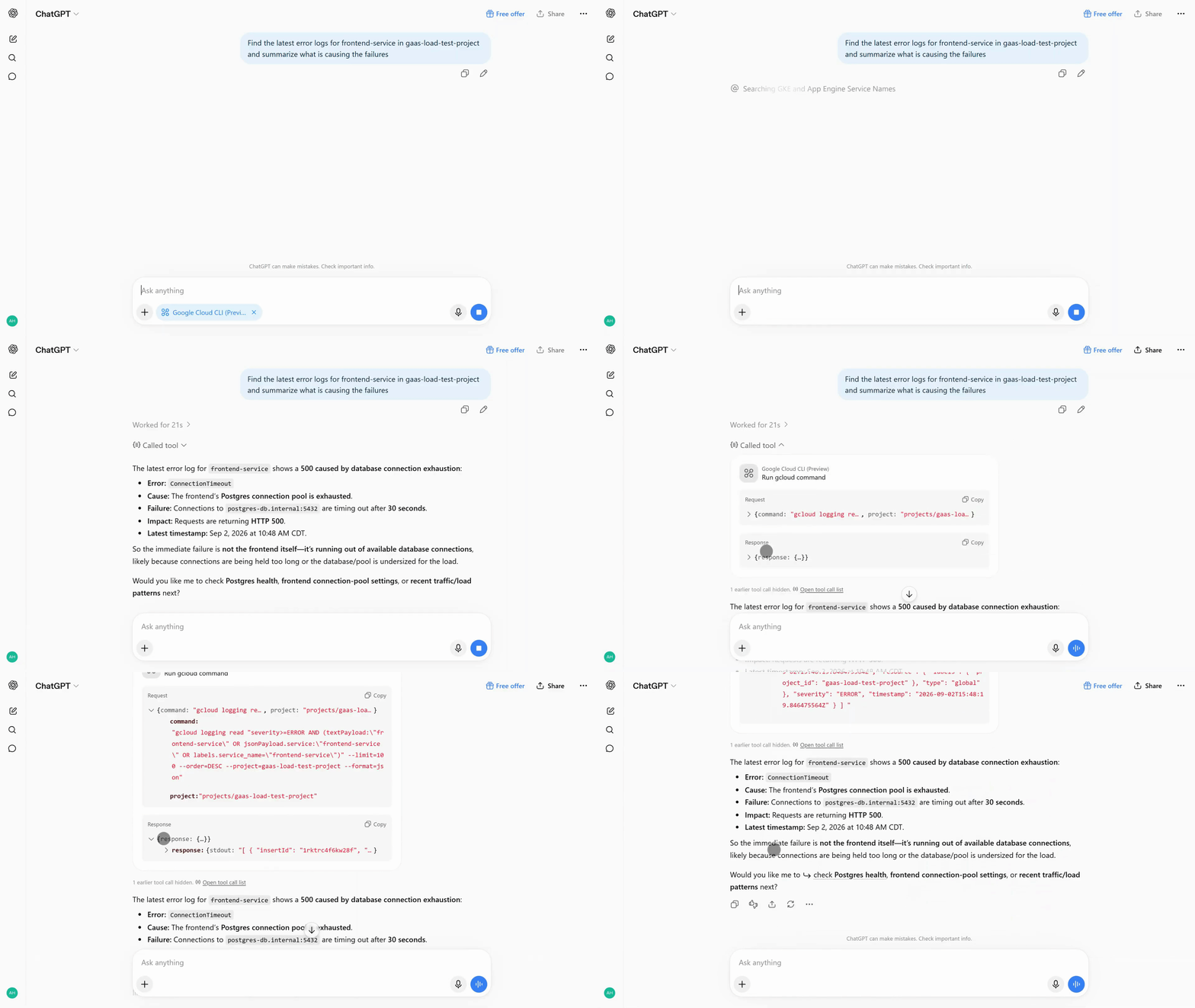
- Best for: Letting an agent handle Google Cloud and BigQuery admin work through a single hosted connection
- When to use it: Your agent runs in a hosted tool like Gemini Enterprise where you can't install software, but it needs to act in Google Cloud
- Who benefits: Data and cloud engineers who run the BigQuery side of a marketing analytics stack
AnthropicfeatureClaude for Government (Generally Available)
Anthropic's Claude desktop app for federal and state agencies, now generally available in a FedRAMP High environment. Only relevant if you work in government.

- Best for: Government teams doing work like memo drafting and RFP reviews inside an approved, compliant environment.
- When to use it: An agency wants Claude on staff devices but needs FedRAMP High authorization, its own sign-on, and hard spending caps.
- Who benefits: IT and procurement leads at federal and state agencies.
Join the newsletter to get ahead with AI.
I share strategies, new modules, free guides, and tools to get you better at using AI in your work.
Leading a team? See team programs →