






 Perplexityapi
Perplexity API MCP Server as an Agent Plugin
Perplexity's API connector now installs as an Agent Plugin in coding tools like Codex, Cursor, and VS Code.
- Best for: Giving a coding assistant live web search without wiring the connection yourself
- When to use it: Your assistant keeps answering from stale training data and needs current sources
- Who benefits: Developers running agents inside Codex, Cursor, or VS Code
PerplexityfeaturePerplexity Computer for Email
You can start a Computer task by emailing it, forwarding a message to it, or adding it to a thread you are already on.

- Best for: Kicking off work without leaving your inbox or opening the app
- When to use it: The task already lives in an email thread and re-explaining it would take longer than forwarding it
- Who benefits: People who work out of their inbox and want the thread itself to be the brief
PerplexitymodelDeepSeek V4 Pro in Perplexity Computer
Perplexity added DeepSeek V4 Pro, hosted in the United States, as a model option inside Computer.
- Best for: Running Computer tasks at a lower cost each
- When to use it: Cost per task matters more to you than topping a benchmark
- Who benefits: Teams running Computer at volume and watching spend
 Anthropicpricing
Claude Code Weekly Limits Extended Through August 31
The 50% higher weekly cap on Claude Code stays in place until August 31 for paid plans.
- Best for: Long Claude Code weeks that used to hit the cap before the project was done
- When to use it: You are scoping work that runs into late August and need to know the ceiling
- Who benefits: Paid Claude plan holders running Claude Code most days
AnthropicfeatureClaude Cowork on Mobile and Web (All Paid Plans)
Cowork, the workspace where you hand Claude a task to work through on its own, now runs on phone and web for every paid plan. It was limited to Max users.
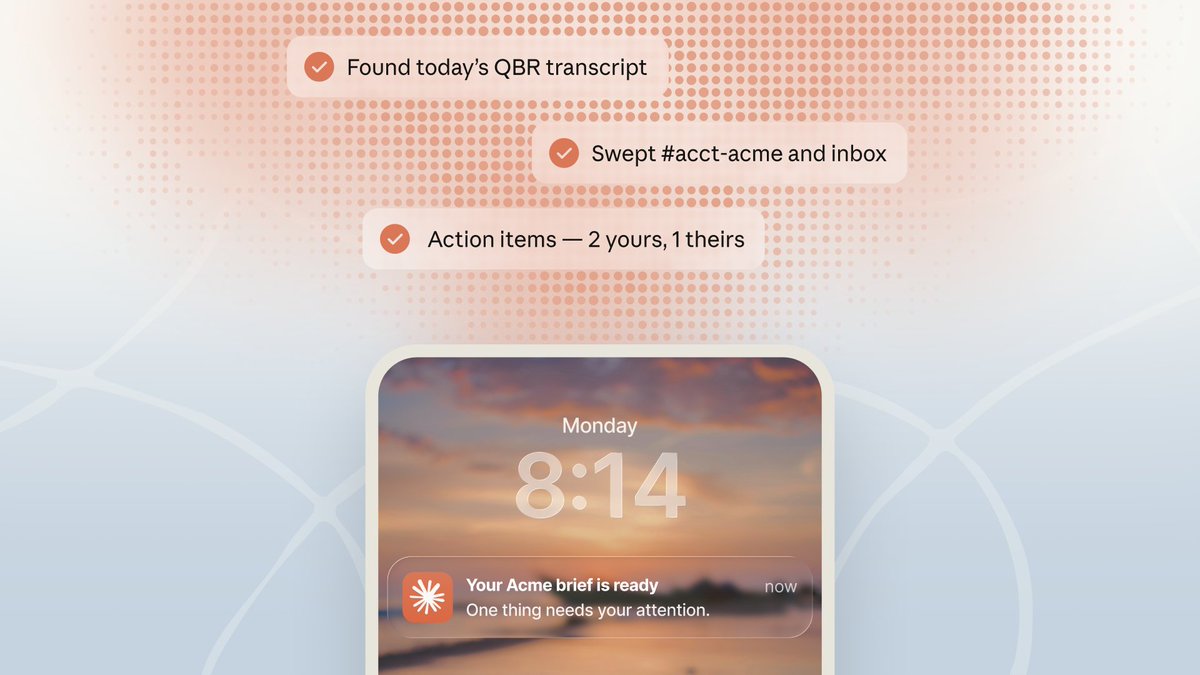
- Best for: Starting a task at your desk and checking on it from your phone
- When to use it: You pay for Claude on a plan below Max and Cowork was out of reach
- Who benefits: Pro and Team subscribers who wanted Cowork without moving up to Max
AnthropicfeatureGmail Send and Drive File Actions in Claude
Claude's Gmail and Google Drive connectors can now take actions like sending a reply or managing a file, instead of stopping at a draft. Available on all paid plans.

- Best for: Handing Claude a full inbox or file task and letting it finish, rather than stopping at a draft you paste in yourself
- When to use it: You keep copying Claude's suggested reply into Gmail by hand
- Who benefits: Marketers and ops people who work out of Gmail and Drive all day
AnthropicfeatureClaude Code Design Skill (Research Preview)
A /design command in Claude Code that produces editable visual artboards for a UI, which Claude can then build into real code.
- Best for: seeing a few visual options for a page or screen before any code gets written
- When to use it: you can describe what you want but cannot picture it, and reviewing a layout is faster than reading a plan
- Who benefits: non-designers building their own tools and landing pages, who until now had to accept whatever Claude produced first
PerplexityapiPerplexity Search SDK
A Python toolkit that lets an AI agent run and refine its own web searches in code instead of making one search call and taking what comes back.

- Best for: building an agent that researches a topic across many sources before it answers
- When to use it: a single search call is too blunt and you want the agent to run several searches, then sort and trim the results itself
- Who benefits: developers building research or monitoring agents on Perplexity
 Googlefeature
Visible Watermark Toggle in Gemini
A setting in the Gemini app that turns off the visible watermark stamped onto images, videos, and music you generate.
- Best for: putting Gemini-made visuals into branded work where a corner stamp would clash
- When to use it: a generated image or video is going into a deck, ad, or social post and the mark sits over the layout
- Who benefits: marketers and designers producing campaign visuals in the Gemini app
GooglefeatureSheets canvas
A prompt-built interactive layer over a Google Sheet that turns the rows into a working mini-app, for Google AI Pro and Ultra subscribers.

- Best for: turning a tracker or planning sheet your team already maintains into something they can click through instead of scroll
- When to use it: the data is fine but nobody reads it, and a dashboard or form would get more use than the raw grid
- Who benefits: marketing and ops people who run campaign trackers, budgets, and content calendars in Sheets and have no one to build them a tool
PerplexityfeatureSearch as Code Optimizations
Small update. Perplexity tuned Search as Code, its research engine from June, to run better and cost less per task.
- Best for: existing Search as Code workloads, with nothing to change on your side
- When to use it: nothing to switch on, the change rolls out this week
- Who benefits: developers already running wide or deep research through Search as Code
PerplexityapiSonar Moving to the Agent API
Perplexity is folding its Sonar search API into the Agent API, which keeps grounded web search and adds tools and model choice.
- Best for: teams already calling Sonar for grounded web search inside their own products
- When to use it: you are starting a new Perplexity API build, or your Sonar calls need more than one search-and-answer step
- Who benefits: developers running Perplexity search in production
PerplexitymodelGrok 4.6 in Perplexity and Perplexity Computer
xAI's Grok 4.6 is now selectable in Perplexity and in Perplexity Computer.
- Best for: running the same Perplexity work on a cheaper model without giving up much quality
- When to use it: cost per task matters more to you than squeezing out the last bit of quality
- Who benefits: Perplexity and Perplexity Computer users who pick their own model
GooglemodelGemini 3.7 Flash
Google's new workhorse Gemini model for coding and agent work, priced at half of 3.6 Flash through the end of 2026.

- Best for: multi-step agent and coding work you were sending to a pricier model for reliability
- When to use it: a task needs planning and tool calls across several steps, not one answer
- Who benefits: developers on the Gemini API, and Google AI Pro and Ultra subscribers in the Gemini app
 OpenAIapi
GPT-5.6 Sol Ultrafast Mode (Limited Preview)
A new OpenAI API service tier that runs GPT-5.6 Sol far faster than standard processing, open to a small set of customers.

- Best for: products where a slow answer is the same as no answer, like live support or voice
- When to use it: you were dropping to a smaller model purely to hit a latency target
- Who benefits: teams building interactive API products on GPT-5.6 Sol
OpenAIfeatureComputer History in the ChatGPT Desktop App
An opt-in Mac setting that turns what you do across your apps and websites into memories ChatGPT and Codex can use.

- Best for: cutting the setup explaining you do at the start of every chat about work already in progress
- When to use it: you keep re-describing the same project context to ChatGPT session after session
- Who benefits: Pro, Business, and Enterprise users on the Mac desktop app
AnthropicfeatureClaude Tag Channel-Wide Context
Claude Tag now reads the whole Slack channel before deciding whether to jump in, for Claude Teams and Enterprise.

- Best for: Slack channels where Claude was answering too often, or staying quiet when it should have answered
- When to use it: your team wants Claude present in a busy channel without it interrupting every thread
- Who benefits: Teams and Enterprise admins running Claude in shared Slack channels
AnthropicfeatureClaude Code Desktop Auto-Continue
A checkbox in the Claude Code desktop app that picks your work back up on its own once your usage limit resets.

- Best for: long Claude Code sessions that keep hitting the usage cap partway through a task
- When to use it: you run out of limit mid-task and don't want to come back later and restart the work by hand
- Who benefits: people running Claude Code in the desktop app for long stretches
 SpaceXAImodel
Grok 4.6
SpaceXAI's frontier model, tuned for agents that run long multi-step jobs and for building interactive and visual work.
- Best for: Long jobs that run across many steps without a person re-prompting at each one
- When to use it: A task needs research, then structure, then a built artifact, and you want one model to carry it through
- Who benefits: Anyone running agent workflows, or turning a brief into a working application
PerplexitymodelNemotron 3.5 Lightning in the Perplexity Agent API
NVIDIA's open-weight Nemotron 3.5 Lightning is now available in Perplexity's Agent API, priced for the high-volume, repetitive parts of an agent's work.

- Best for: The cheap, repetitive steps inside an agent: calling tools, checking results, and handing work off to subagents.
- When to use it: An agent is making the same kind of call thousands of times and a frontier model's price stops making sense.
- Who benefits: Developers running always-on agents where the constraint is cost per call, not reasoning depth.
Join the newsletter to get ahead with AI.
I share strategies, new modules, free guides, and tools to get you better at using AI in your work.
Leading a team? See team programs →