






 Googlefeature
Copy a Notebook in Gemini Notebook
You can duplicate a notebook in Gemini Notebook, carrying every source and artifact into your own copy.

- Best for: Turning a notebook someone shared with you into your own working version without rebuilding the source list by hand.
- When to use it: You want to build on a shared notebook but need your changes kept separate from the original.
- Who benefits: Teams running a shared research or briefing notebook that each person then adapts for their own work.
GooglefeatureNew Connected Apps in Gemini
Gemini can now link to 13 more outside services, including Otter.ai, Granola, Wix, and Ticketmaster, so it can act inside those tools from a chat.

- Best for: Handing Gemini a task that lives in a tool you already pay for, like pulling a summary out of Otter.ai or editing a page on a Wix site.
- When to use it: The work sits in a third-party service and you would otherwise switch tabs and do it by hand.
- Who benefits: Marketers running a stack of small SaaS tools, especially anyone taking a lot of meeting notes or maintaining a site.
 Anthropicfeature
Claude Cowork in the Chrome Side Panel
The Claude in Chrome side panel now runs a full Claude Cowork session, so a task you start in a browser tab continues in the desktop, web, and mobile apps.
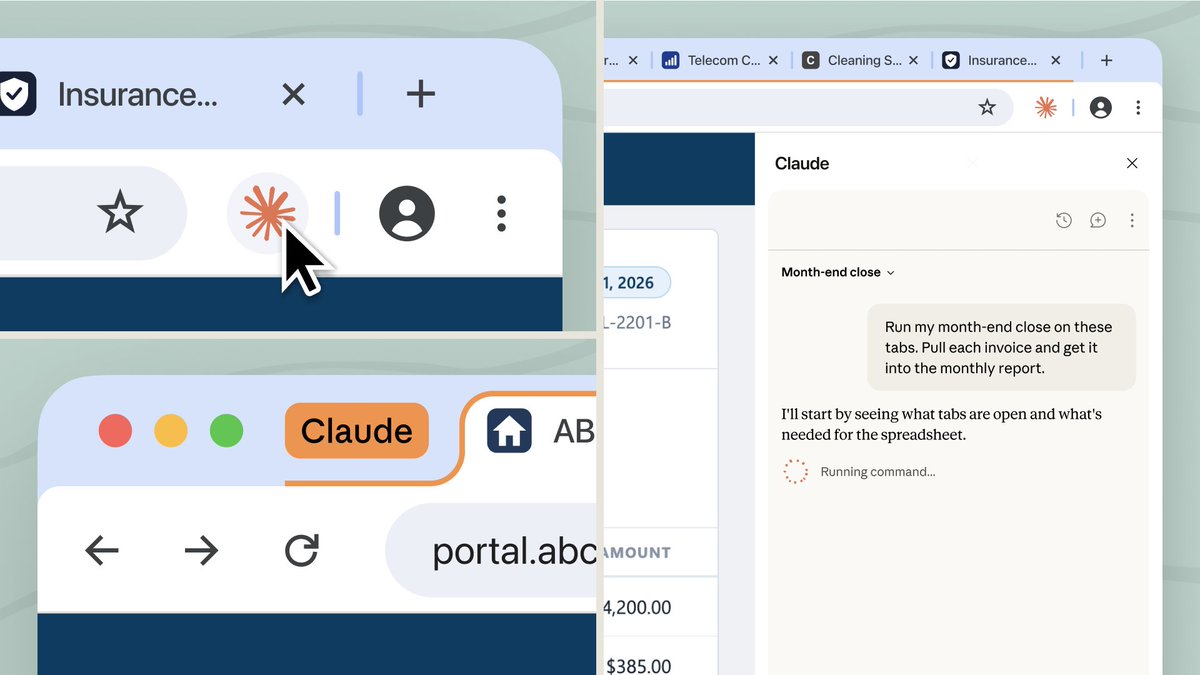
- Best for: Work that starts as browsing and turns into a task: pulling numbers off a vendor portal, filling out a form, checking an internal dashboard, then finishing it somewhere else.
- When to use it: You need Claude to act inside a site you are already logged into, instead of copying the page contents into a separate chat.
- Who benefits: Marketers and ops people who live in web tools that have no direct Claude integration, like internal dashboards and vendor portals.
 SpaceXAIfeature
Grok Bot
Agents that run on their own cloud computer, sign into your tools, and keep working when you step away.
- Best for: Handing off a multi-step job end to end instead of supervising every step
- When to use it: The work spans several apps and would otherwise be you clicking through all of them
- Who benefits: People whose week fills up with coordination work across tools that do not talk to each other
 Microsoft Copilotfeature
Copilot Consumption Dashboard in Viva Insights
A dashboard in Viva Insights showing how many Copilot credits your organization is burning, and on which services.
- Best for: Watching AI spend as it happens rather than finding out when the bill arrives.
- When to use it: You have rolled Copilot out to a team and nobody can say what it is costing.
- Who benefits: Managers with at least five direct reports, Insights analysts, and global admins, the only roles who can see it.
Microsoft CopilotfeatureAdobe Experience Manager Assets in Copilot for PowerPoint
Copilot in PowerPoint can build slides using your company's own approved images, if those images live in Adobe Experience Manager.
- Best for: Decks that have to stay on brand, where a stock photo or a generated image would be the wrong call.
- When to use it: Your brand assets already sit in Adobe Experience Manager and people keep building decks with the wrong images anyway.
- Who benefits: Brand and marketing teams at companies running Adobe Experience Manager as the asset library.
Microsoft CopilotfeatureOutlook Copilot Coaching in Chat
Copilot's email coaching moved into the chat pane, so you can pick which suggested edits get applied instead of taking all of them at once.
- Best for: Tightening an email before it goes out, especially one you are going to be judged on.
- When to use it: The draft is written but the tone or the clarity is off and you want a second pass you can argue with.
- Who benefits: Anyone sending a high volume of outbound or client-facing email.
Microsoft CopilotmodelAnthropic Models in Copilot for Word
Copilot in Word lets you pick an Anthropic model instead of an OpenAI one when editing a document.
- Best for: Long-form document editing where you want a second model's read on the same draft.
- When to use it: The edits an OpenAI model returns are not landing and you want to run the same passage through a different one.
- Who benefits: Content and communications people drafting substantial documents in Word rather than short replies.
 OpenAIfeature
Import from Other Agents in ChatGPT and Codex
ChatGPT and Codex can now pull your setup, projects, and recent chats over from Claude Code, Claude Cowork, or Cursor.

- Best for: moving into Codex without rebuilding the instructions, skills, and connections you already configured in another agent
- When to use it: you are trialing Codex alongside a tool you already use and don't want to hand-copy your setup to compare them fairly
- Who benefits: developers and teams switching agents or running two of them in parallel
OpenAIfeatureChatGPT Desktop App for Linux (Preview)
The ChatGPT desktop app now runs on Linux, bringing ChatGPT, ChatGPT Work, and Codex to the same machine you build on.
- Best for: working in ChatGPT and Codex on a Linux machine instead of living in a browser tab
- When to use it: Linux is your daily driver and you have been stuck with the web app while Mac and Windows users had the desktop one
- Who benefits: developers and technical teams on Linux workstations
AnthropicapiCompliance API for Claude Cowork and Claude Code
Claude Enterprise security teams can now pull full session transcripts from Cowork and Claude Code through the same Compliance API that already covered Claude chats.

- Best for: security and compliance teams that need a record of what people did inside Cowork and Claude Code, not only what they typed into Claude chat
- When to use it: your organization has to retain or review AI session activity, and those two products were the gap in that record
- Who benefits: enterprise security, legal, and compliance staff who own retention and eDiscovery
 Metamodel
Muse Glimmer
A 30-billion-parameter open-weights agentic model under Apache 2.0 that runs locally on a single consumer GPU.
- Best for: Running agentic workflows and tool calling entirely on your own hardware, with no API calls leaving the machine
- When to use it: Data cannot leave your device, or you want agent capability without per-token cost
- Who benefits: Teams with data-residency or confidentiality constraints that have blocked them from using hosted agents
 Perplexityapi
Kimi K3 in the Perplexity Agent API
Moonshot AI's Kimi K3 model is now callable through Perplexity's Agent API, hosted on U.S. servers.

- Best for: Building agents on a model outside the big three labs without routing data to overseas servers.
- When to use it: You want Kimi K3 inside an agent workflow and the hosting location matters to your team.
- Who benefits: Developers on the Perplexity Agent API comparing model cost against capability.
AnthropicpricingClaude Sonnet 5 Pricing Made Permanent
The launch price for Sonnet 5, $2 per million input tokens and $10 per million output tokens, stays instead of rising after August 31.

- Best for: Budgeting high-volume agent and automation work that runs on Sonnet 5 through the API.
- When to use it: You held off building on Sonnet 5 because the cheap rate was scheduled to expire.
- Who benefits: Developers and teams running large token volumes through the Sonnet 5 API.
OpenAIpricingChatGPT Business Premium Seats
A higher-capacity seat for ChatGPT Business at $125 per user per month, with five times the usage of a Standard seat.
- Best for: Teams where a few heavy users keep hitting ChatGPT limits partway through a project.
- When to use it: Your most active people run out of capacity before the work is finished and the rest of the team does not.
- Who benefits: Workspace owners on ChatGPT Business who want to buy extra capacity per person instead of upgrading everyone.
OpenAImodelGPT-5.6-Cyber
OpenAI's cybersecurity-specific model, available only to defenders vetted into the new Daybreak Red access tier.

- Best for: Authorized vulnerability research, exploit validation, and security testing inside an approved security team.
- When to use it: You are a vetted defender who needs a model that engages with dual-use security work instead of refusing it.
- Who benefits: Security researchers and red teams at organizations approved into OpenAI's Daybreak program.
SpaceXAImodelImagine Image 2.0
Grok's image model, rebuilt for images you can ship, with editing that changes only the part you point at.

- Best for: Producing and then revising a usable visual asset, not a one-off picture
- When to use it: The first generation is close and you need to change one region without regenerating everything
- Who benefits: Content and brand marketers making their own visuals
AnthropicfeatureClaude Managed Agents Update (Budgets, Regions, Skills, Advisors)
Four changes to Claude Managed Agents: a spend cap per session, control over where the work runs, skills loaded from your own repository, and a stronger model an agent can consult mid-run.

- Best for: Teams running Claude Managed Agents on real workloads where cost and data location matter
- When to use it: An agent session can run up an unpredictable bill, or your compliance rules require the work to stay in the US
- Who benefits: Developers and platform teams operating Managed Agents in production rather than testing them
AnthropicfeatureCross-Session Messaging in Claude Code
Claude Code sessions can now send each other a summary of what they are working on, so you do not have to re-explain a task in a second session.

- Best for: Running several Claude Code sessions at once and needing one to hand work off to another
- When to use it: A long job is running in one session and you want to keep working in another without retyping the context by hand
- Who benefits: Developers who keep multiple Claude Code sessions open across projects or machines
AnthropicmodelClaude Fable 5 Biology Safeguards Update
Fable 5 now answers everyday health and biology questions it used to refuse or hand off.
- Best for: Health, medical, and science questions that Fable 5 was declining to answer
- When to use it: You hit a refusal on an ordinary health or biology question and had to reword it or switch models
- Who benefits: Anyone using Fable 5 for health, science, or educational work
Join the newsletter to get ahead with AI.
I share strategies, new modules, free guides, and tools to get you better at using AI in your work.
Leading a team? See team programs →