






 OpenAImodel
GPT-5.6 in the API (Generally Available)
The GPT-5.6 family from OpenAI is out of limited preview and open to all API developers in three tiers.
- Best for: Matching a price and speed tier to each task instead of routing everything through one flagship model.
- When to use it: You are picking a model for production and want cost to track how hard the task actually is.
- Who benefits: Developers and technical marketers building on the OpenAI API.
 Perplexitymodel
Perplexity Computer Orchestrator Model (Research Preview)
A cheaper model that runs the planning layer inside Perplexity Computer, released as a research preview.
- Best for: Running agent tasks in Perplexity Computer without paying frontier prices on every step.
- When to use it: Cost per task matters more to you than squeezing out the last increment of quality.
- Who benefits: Perplexity Computer users running long or repetitive agent jobs.
 Anthropicfeature
Claude Reflect (Beta)
A dashboard in Claude settings that shows how you have been using Claude, with optional break reminders and quiet hours.
- Best for: Seeing where your Claude time actually goes across topics, days, and hours.
- When to use it: You suspect you lean on Claude for some kinds of work and neglect others, and you want the pattern in front of you.
- Who benefits: Individual practitioners auditing their own AI habits rather than a team's.
 Metamodel
Muse Spark 1.1
A multimodal reasoning model from Meta built for agent work, now in the Meta AI app and open to developers through a new API in public preview.

- Best for: Agent work that has to read screens, documents, and video, then act across applications.
- When to use it: The task needs a model to operate software and hold a long project in context.
- Who benefits: Developers building agents, and Meta AI users who switch on Thinking mode.
 Manusfeature
Manus Branch
Split any Manus conversation into a parallel session that carries the full context forward while the original stays untouched.
- Best for: Taking one body of research in several directions without rebuilding context each time.
- When to use it: You want to try a different output or approach but do not want to disturb the thread you already have.
- Who benefits: Anyone running long research sessions that need to produce more than one deliverable.
OpenAImodelGPT-Live
A new generation of ChatGPT voice models that can listen and talk at the same time, so a conversation feels closer to talking with a person.

- Best for: back-and-forth voice conversations where you interrupt, pause, and think out loud instead of typing
- When to use it: brainstorming by talking, live translation, or asking questions while your hands are busy
- Who benefits: marketers who work through ideas and research out loud rather than at a keyboard
ManusfeatureManus Google Workspace Connector
A single Manus connector for Google Drive, Docs, Sheets, Slides, and Forms, with a separate access level you set for each one.

- Best for: letting Manus work across your Google files without setting up a separate connection for each app
- When to use it: you want Manus to read from or edit Drive, Docs, Sheets, Slides, or Forms in one setup
- Who benefits: teams that keep their documents, spreadsheets, and decks in Google Workspace
AnthropicfeatureClaude Cowork on Mobile and Web
Cowork, Claude's delegated-task workspace, now runs on web and phone, not just desktop, starting with Max users.
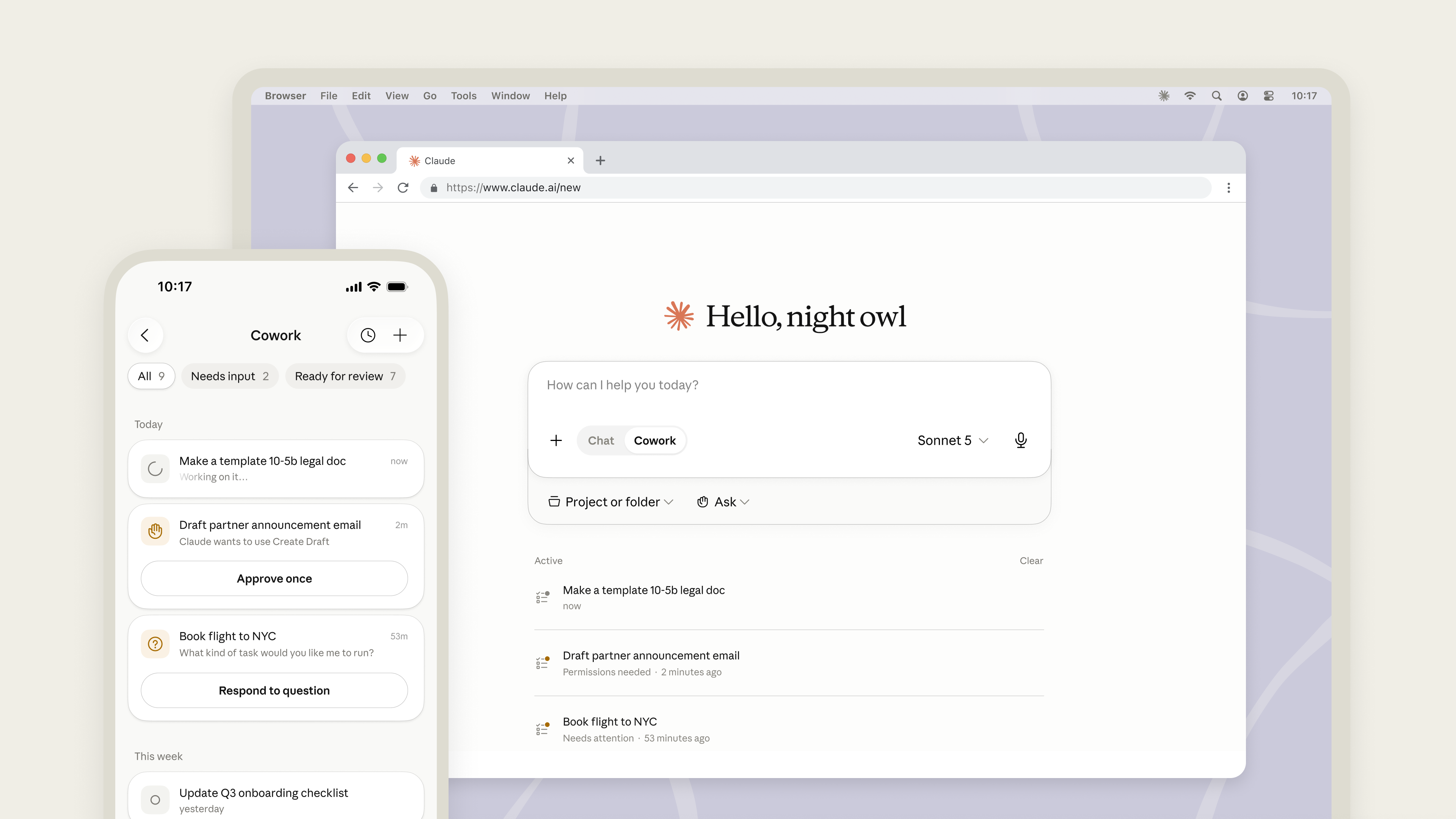
- Best for: Handing Claude a longer task on one device and picking up the finished work on another
- When to use it: You want to start work at your desk and check or collect it from your phone later
- Who benefits: Max subscribers who delegate multi-step work to Claude and move between devices
AnthropicfeatureMicrosoft 365 Connector Write Tools
Claude's Microsoft 365 connector can now send email, manage your calendar, and edit OneDrive and SharePoint files, not just read them.
- Best for: having Claude act inside your Microsoft 365 account instead of only searching and summarizing it
- When to use it: you want Claude to draft and send email, set up calendar events, or update files in OneDrive and SharePoint
- Who benefits: Microsoft 365 teams who want Claude handling routine inbox, calendar, and file work
AnthropicfeatureClaude Code Model and Effort Level Selection
Claude Code now lets you pick both the model and how thoroughly it works on a task.

- Best for: matching Claude Code depth and cost to the task, from quick edits to deep multi-step work
- When to use it: a job needs more thoroughness or less than the default and you want to control spend
- Who benefits: Claude Code users on desktop, VS Code, JetBrains, web, and Slack
MetamodelMuse Image and Muse Video
Meta's new image and video generation models, free inside the Meta AI app, Instagram, and WhatsApp.

- Best for: Generating and editing marketing visuals and short video from a text prompt or reference images, without a separate design tool
- When to use it: You need an on-brand image or a short clip fast and already work inside Meta's apps
- Who benefits: Social and content marketers creating for Instagram, Facebook, and WhatsApp
OpenAImodelGPT-Realtime-2.1-mini
A cheaper voice model in OpenAI's API that now handles reasoning and tool use, for developers building live voice apps.
- Best for: Building real-time voice features like agents and assistants where cost matters but you still want the model to reason and call tools
- When to use it: You need a voice model that can think through steps without paying for the full-size Realtime model
- Who benefits: Developers building live voice products on OpenAI's Realtime API
AnthropicfeatureClaude Admin Analytics and Spend Controls
New Claude Enterprise dashboards and controls for tracking how teams use Claude and capping spend.
- Best for: seeing where an organization's Claude usage and cost is going and setting limits
- When to use it: you administer Claude for a company and need usage visibility or budget guardrails
- Who benefits: admins and IT leads managing a Claude Enterprise rollout
 Googlefeature
Gemini Spark on macOS
Google's Gemini Spark assistant is coming to the Gemini app on Mac, with new app connections.

- Best for: running Gemini's always-on assistant from your Mac and wiring it into the apps you use
- When to use it: you want a persistent AI agent that can act across your accounts, not just answer chat questions
- Who benefits: Gemini app users on macOS who want the assistant tied into their tools
 Microsoft Copilotfeature
Create Office Files from Copilot Notebooks
Copilot Notebooks can now turn the sources you have gathered into PowerPoint, Word, and Excel files.
- Best for: turning a collection of notes and references into a finished document in one step
- When to use it: you have pulled content into a Copilot Notebook and need it as a deck, doc, or spreadsheet
- Who benefits: people who use Copilot Notebooks to gather research before producing deliverables
Microsoft CopilotfeatureBrand Kit for Visuals in Copilot Chat
Copilot Chat can apply your organization's brand kit and style to the visuals it generates.
- Best for: keeping AI-generated images and graphics on-brand without manual restyling
- When to use it: you generate visuals in Copilot Chat and need them to match company colors and style
- Who benefits: marketing and comms teams who have to hold a consistent brand look
Microsoft CopilotmodelMAI-Image-2-Efficient in Copilot for PowerPoint
A faster Microsoft image model for generating slide visuals inside Copilot in PowerPoint.
- Best for: generating and iterating on images for slides without leaving PowerPoint
- When to use it: you are drafting a deck and want visuals in the moment rather than sourcing them separately
- Who benefits: anyone building presentations in Microsoft 365 with Copilot
ManusfeatureManus for Small Business
A Manus toolkit of connectors and prebuilt workflows aimed at solopreneurs and small teams.
- Best for: running common small-business tasks through Manus without building the automation from scratch
- When to use it: you run a small team or solo operation and want ready-made workflows wired to the tools you already use
- Who benefits: solopreneurs and small teams who use Shopify, HubSpot, or similar tools day to day
PerplexitymodelClaude Sonnet 5 in Perplexity
Perplexity added Anthropic's Claude Sonnet 5 as a selectable model for paid subscribers.
- Best for: running Perplexity searches and tasks on Anthropic's newest Sonnet model instead of the default
- When to use it: you prefer Claude's reasoning and writing for research inside Perplexity
- Who benefits: Perplexity Pro and Max subscribers who want to pick the underlying model
GooglefeatureShort Video Overviews in NotebookLM
NotebookLM can turn the sources you upload into a 60-second vertical video that explains one concept.

- Best for: turning a dense source into a short explainer you can watch on your phone
- When to use it: you want the gist of a complex document or topic without reading it or sitting through a longer audio overview
- Who benefits: marketers and researchers who load reports or briefs into NotebookLM and want a fast visual recap
Join the newsletter to get ahead with AI.
I share strategies, new modules, free guides, and tools to get you better at using AI in your work.
Leading a team? See team programs →