






 Perplexityfeature
Perplexity Projects
A shared workspace in Perplexity Computer where files, memory, and tasks carry over from one session to the next, replacing Spaces.

- Best for: Ongoing work that spans weeks, where you keep re-explaining the same background every time you start a task
- When to use it: You have several related tasks running against the same set of documents and want them all reading and writing the same files
- Who benefits: Small teams sharing a workstream, and anyone who runs repeat or scheduled tasks against a fixed set of source material
 Googlefeature
Gemini Spark Chrome Integration
Gemini Spark can now drive Chrome on your behalf, using your logged-in accounts and saved passwords to finish web tasks. United States only for now.
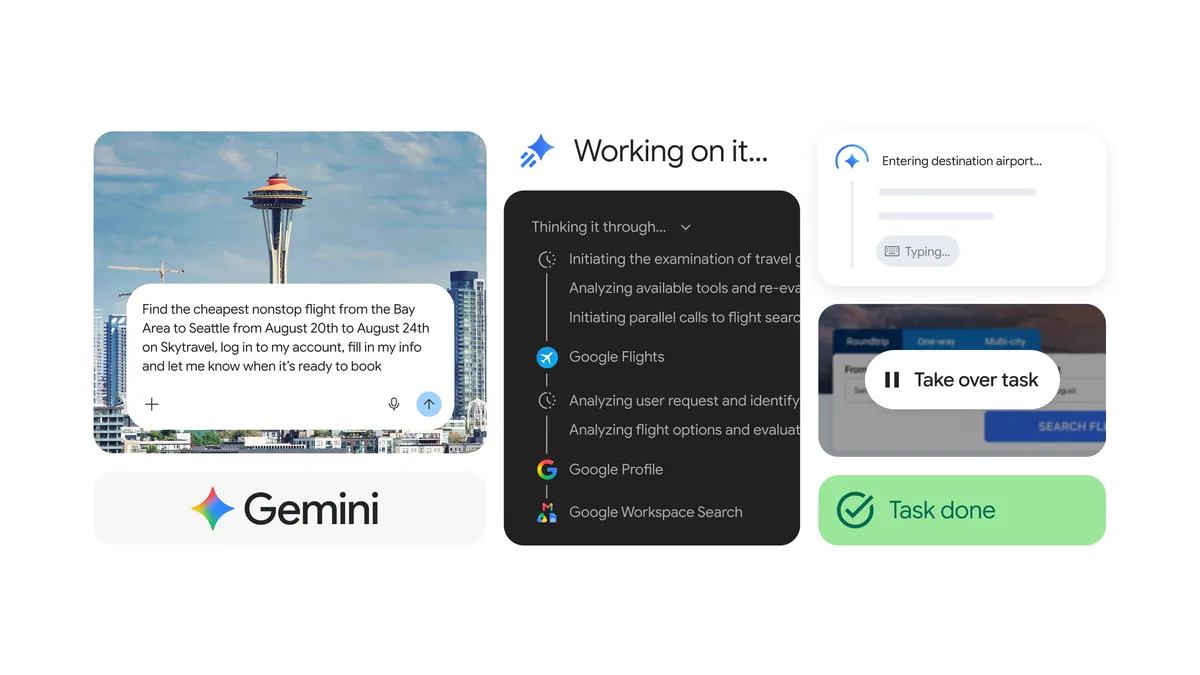
- Best for: Errands that take a dozen clicks across sites you are already signed into.
- When to use it: The task is tedious and repeatable and you are willing to review the final action before it commits.
- Who benefits: Google AI Pro subscribers in the United States.
 Microsoft Copilotfeature
SharePoint List Support in Agent Builder
Agents built in Microsoft 365 Copilot Agent Builder can now use a SharePoint list as a knowledge source, so they answer from structured data.
- Best for: An agent that has to answer from a table your team already maintains, like a product list or an approval log.
- When to use it: The answers live in rows and columns rather than in documents.
- Who benefits: Anyone building Copilot agents in Agent Builder, no code required.
Microsoft CopilotfeatureCopilot Notebooks Overview Redesign
The Overview panel in Copilot Notebooks in OneNote was rebuilt around shorter summaries and one-click actions.
- Best for: Picking up a research notebook you have not opened in a while.
- When to use it: You keep a running notebook of sources and want its current state without rereading everything.
- Who benefits: OneNote users with Copilot on Windows, Mac, and the web.
Microsoft CopilotfeatureRich Images Inline in Copilot Responses
Copilot now shows images pulled from your files and meetings inside its answers instead of describing them in text.
- Best for: Questions about documents and meeting recordings where the answer is a picture, not a paragraph.
- When to use it: You are asking about a deck, a report, or a recorded meeting that carried visuals.
- Who benefits: Microsoft 365 Copilot users on Windows and the web.
Microsoft CopilotfeatureTake Screenshot in Copilot
A screenshot tool built into Microsoft 365 Copilot Chat on Windows, so you can capture what is on screen and drop it straight into a prompt.
- Best for: Asking Copilot about something you can see but cannot easily paste, like a chart or a dashboard.
- When to use it: Describing the thing in words would take longer than showing it.
- Who benefits: Microsoft 365 Copilot Chat users on Windows.
GooglefeatureAgent Runtime and Agent Identity (Generally Available)
Google's managed hosting and permission system for long-running agents is out of preview on the Gemini Enterprise Agent Platform.
- Best for: Agents that need to keep working for days rather than finish inside one session.
- When to use it: You are past the prototype and the agent needs its own permissions, audit trail, and memory.
- Who benefits: Engineering and IT teams building agents for the business on Google Cloud.
 SpaceXAImodel
Grok Voice Think Fast 2.0
A speech-to-speech model for building phone and voice agents, priced per minute of audio.
- Best for: Voice agents that hold a real conversation and call tools mid-call
- When to use it: You are building a support or sales line rather than a text chatbot
- Who benefits: Teams running phone support or outbound calling who want to test an AI voice
PerplexityapiNumbat
Perplexity's free open-source tool that watches what AI agents do on a computer and can stop risky actions before they run.

- Best for: Teams letting AI agents run on real machines who need a record of what those agents actually did
- When to use it: Agents have permission to touch files, run commands, or reach the network on company hardware
- Who benefits: Security and IT teams supporting people who use agent tools day to day
GooglefeatureVoice Dictation in Gemini for macOS
Hold the Fn key to talk into any window on your Mac, and Gemini writes it down as clean text.

- Best for: Drafting emails, notes, and messages by talking, without leaving the app you are already in
- When to use it: You think faster than you type, or you are writing the same kind of short message over and over
- Who benefits: Anyone on a Mac who writes a lot of short-form copy and replies during the day
PerplexitymodelKimi K3 in Perplexity
Kimi K3 is now one of the models you can pick inside Perplexity and Perplexity Computer, on Pro and Max.

- Best for: Putting a different model on a task without leaving Perplexity and rebuilding your prompt somewhere else.
- When to use it: Your usual model keeps stalling on a specific kind of task and you want a second engine on it.
- Who benefits: Pro and Max subscribers who already switch models depending on the job.
 OpenAImodel
GPT-Transcribe and GPT-Live-Transcribe
Two speech-to-text models in the OpenAI API, one for finished audio files and one for transcribing while someone is still talking.

- Best for: Turning recorded calls, interviews, and webinars into text, or putting live captions on audio as it plays.
- When to use it: Reach for GPT-Transcribe on audio you already have. Reach for GPT-Live-Transcribe when the text needs to appear before the speaker finishes.
- Who benefits: Developers wiring transcription into a product, and teams pushing large volumes of recorded audio through an API instead of a desktop tool.
PerplexityfeatureModel Council in Computer
Runs one question across several frontier models inside Perplexity Computer and returns a single cited report on where they agree and where they split.

- Best for: Questions where one model's answer is not enough and you want the disagreement made visible instead of averaged away.
- When to use it: The stakes are high enough that a single confident wrong answer would cost you something.
- Who benefits: Researchers and analysts who currently paste the same prompt into three tools by hand and reconcile the answers themselves.
PerplexityfeaturePerplexity Personal Computer (Now Available on Windows)
Perplexity's local agent app is live on Windows, after being Mac-only.

- Best for: Running research and file work on your own machine instead of inside a browser tab.
- When to use it: Your working files and apps sit on a Windows PC and you want an agent that can open them directly rather than being handed uploads.
- Who benefits: Windows-based analysts and operators who were shut out of this while the app only ran on Mac.
 Anthropicfeature
MCP 2026-07-28 Support in Claude
Claude is adopting the newest version of the open standard that connects it to outside tools and data, with cheaper hosting for connector builders and company sign-in for IT teams.
- Best for: Hooking Claude up to your company's own tools, files, and internal systems.
- When to use it: Your team wants Claude reaching internal systems under IT-managed sign-in rather than each person wiring up their own connection.
- Who benefits: IT and ops teams provisioning connectors across a whole organization, plus anyone building a connector.
SpaceXAIfeatureBuild Mode
Describe an app, site, or dashboard in a Grok chat and it builds a working version you can publish to a link.
- Best for: Turning an idea into something clickable without opening a code editor
- When to use it: You want to show a working version of an idea instead of describing it
- Who benefits: Marketers and operators who prototype internal tools and microsites
GoogleapiManaged Agents (Free Tier, Hooks, and Scheduled Runs)
Google's hosted agent service in the Gemini API adds a free tier, spend caps, and recurring runs, for developers building on the API.

- Best for: Running agent tasks on Google's infrastructure instead of building and hosting the agent loop yourself
- When to use it: An agent task needs to run on a schedule, or you need a hard cap on what a single run can spend
- Who benefits: Developers and technical teams already building on the Gemini API
OpenAIfeatureGPT-Live in ChatGPT Voice (Edu, Business, and Enterprise)
OpenAI's live voice model is now on ChatGPT's school and work plans worldwide, not only the consumer plans.

- Best for: Talking through work out loud on a company or school ChatGPT account instead of typing it.
- When to use it: Your team sits on a Business, Enterprise, or Edu plan and you want the voice mode that responds mid-sentence rather than waiting for you to finish.
- Who benefits: Marketing teams on company ChatGPT seats who dictate briefs, think out loud, or run voice sessions on mobile.
PerplexitymodelClaude Opus 5 in Perplexity
Anthropic's Opus 5 is now selectable in Perplexity and Perplexity Computer.
- Best for: Running research and agent tasks on Anthropic's newest model without leaving Perplexity.
- When to use it: A task needs stronger reasoning than the default model gives you and you are willing to pick the model yourself.
- Who benefits: Perplexity subscribers on paid plans, and teams using Perplexity Computer for agent work.
PerplexityapiPerplexity CLI
A command-line tool that lets coding agents run Perplexity web searches and pull page text from the terminal.
- Best for: Giving a coding agent live web access so it can look up current docs or news instead of working from what it was trained on.
- When to use it: Your agent needs information newer than its training cutoff, or you want search results back as structured data a script can parse.
- Who benefits: Developers running terminal agents like Claude Code or Codex.
Join the newsletter to get ahead with AI.
I share strategies, new modules, free guides, and tools to get you better at using AI in your work.
Leading a team? See team programs →