






 Anthropicfeature
Claude Design Updates (Beta on Paid Plans)
Claude's design tool reaches all paid plans in beta, now staying true to your design system, syncing two ways with Claude Code, and editable directly on the canvas.
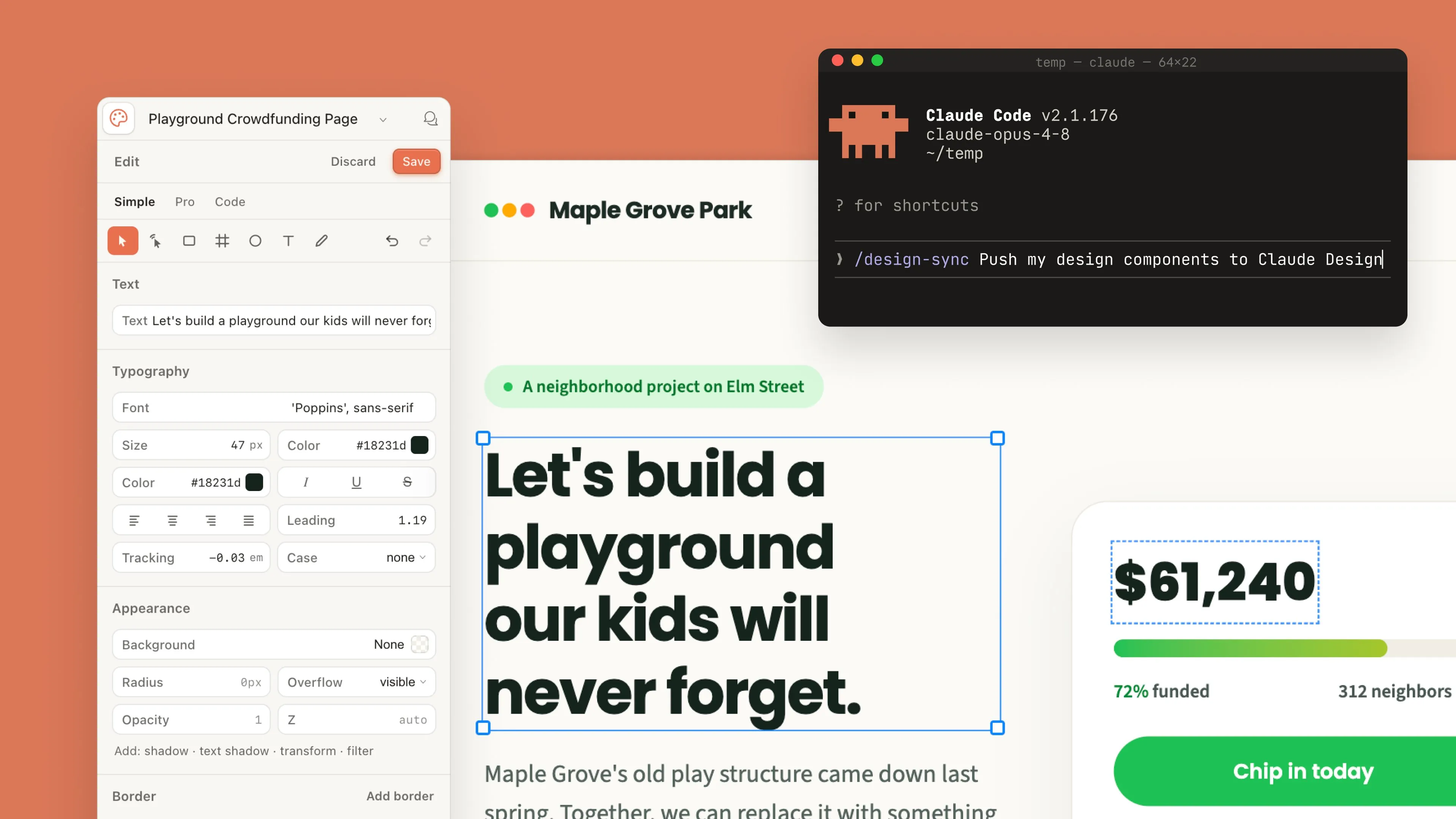
- Best for: Turning a described idea into an on-brand, editable design and handing it straight to Claude Code to build.
- When to use it: You want design and code to stay in sync instead of rebuilding a UI from a screenshot.
- Who benefits: Designers and product teams on Claude paid plans who also build in Claude Code.
AnthropicapiClaude Workload Identity Federation
A way for companies to connect to the Claude API without storing permanent API keys. Each request gets a short-lived credential issued on the spot. Enterprise and developer setups only.
- Best for: Security teams that do not want long-lived Claude API keys sitting in their systems.
- When to use it: You are wiring Claude into AWS, Google Cloud, or GitHub Actions and want those systems to authenticate without a stored key.
- Who benefits: Engineering and security teams running Claude in production, not end users.
 Microsoft Copilotmodel
FLUX.2 Flex in PowerPoint
A new image-generation model option in the PowerPoint Copilot image picker, from Black Forest Labs, built to render text and layouts cleanly.
- Best for: Generating slide visuals that contain readable text, like infographics, diagrams, or UI mockups.
- When to use it: The default image model garbles typography or layout and you want cleaner text in a generated image.
- Who benefits: Copilot Premium users who build image-heavy presentations in PowerPoint.
 Manusfeature
Manus Message Queue
Line up follow-up prompts while a Manus task is still running, and Manus runs them in order once it finishes.

- Best for: Stacking your next instructions while a task is mid-run so an idea does not get lost
- When to use it: A follow-up or correction comes to mind before the current task has finished
- Who benefits: Anyone running long Manus builds who wants to line up several steps and walk away
 OpenAIfeature
Codex Rate Limit Banking
Codex users can save an unused rate limit reset and spend it later instead of losing it to a fixed schedule.

- Best for: Developers who hit their Codex usage limit mid-task and want their next reset available on demand instead of waiting for the scheduled one.
- When to use it: You are working in bursts and want to stack a reset for a heavy session rather than let it expire unused.
- Who benefits: Codex users on ChatGPT Go, Plus, Pro, and Business plans.
 Perplexityfeature
Deep Research in Computer
Perplexity's deep research tool now runs as a built-in skill inside Computer, its agent, for Pro and Max subscribers.

- Best for: long, multi-step research that pulls from live web search, connected tools, and licensed data in a single run
- When to use it: a question needs thorough, sourced research across many steps, not a quick one-shot search
- Who benefits: analysts, researchers, and anyone doing heavy desk research inside Computer
PerplexitymodelClaude Fable 5 in Perplexity Computer
Perplexity's agentic Computer product can now use Anthropic's Fable 5 as the model that plans and runs multi-step tasks, for Pro and Max subscribers.

- Best for: Running long, multi-step tasks in Perplexity Computer where the agent has to plan the work and coordinate many actions.
- When to use it: You pay for Pro or Max and want Computer's agent driven by Anthropic's strongest model for complex work.
- Who benefits: Perplexity Pro and Max subscribers who use Computer for research and agentic workflows.
Microsoft CopilotfeatureAgent Memory in Copilot Studio (Preview)
Copilot Studio agents can remember a person's preferences and context between conversations.
- Best for: Agents people use repeatedly, where re-explaining context every session is the friction
- When to use it: Your agent serves the same people week after week and should not need reminding who they are
- Who benefits: Makers building conversational agents for an internal team
AnthropicfeatureScheduled Deployments and Vaults for Claude Managed Agents (Public Beta)
Claude Managed Agents can now run on a set schedule and pull credentials from encrypted vaults, both in public beta.

- Best for: Teams that want an agent to run recurring jobs automatically instead of kicking off each run by hand.
- When to use it: An agent task needs to fire at set times and reach tools that require API keys or passwords.
- Who benefits: Operations and technical teams running Claude Managed Agents in production.
AnthropicmodelClaude Fable 5
Anthropic's newest model available to the public, adapted from its restricted top-tier Mythos line and shipped with built-in safety guardrails.

- Best for: Long-running coding and analysis that earlier models could not sustain in a single stretch.
- When to use it: Hard engineering or deep knowledge work where Opus 4.8 stalls or needs constant steering.
- Who benefits: Engineers, analysts, and researchers running complex, multi-step tasks.
ManusfeatureManus Zoom Connector
Connect Zoom to Manus so it can work from your meetings to summarize, search, and turn calls into follow-up work.

- Best for: Turning recurring meetings into searchable knowledge and follow-up tasks.
- When to use it: Decisions, quotes, and action items from a call are scattered across transcripts and notes.
- Who benefits: Teams running lots of customer or internal calls who lose track of what was said.
 Googlemodel
Gemini 3.5 Live Translate
A Google audio model that translates speech to speech in near real time across 70+ languages, rolling out in the Google Translate app.

- Best for: Live conversations between people who do not share a language.
- When to use it: You need translation as you speak, not a transcript to read afterward.
- Who benefits: Anyone doing cross-language calls, meetings, or travel, plus business Workspace users in private preview.
OpenAIapiImage Results in Responses API Web Search
Apps built on OpenAI's Responses API can now pull image results from web search, not just text and links.

- Best for: Apps that need to show products, places, or visual references, not just describe them.
- When to use it: Your app's users expect to see images in search results rather than read about them.
- Who benefits: Developers building search, shopping, or inspiration features on the Responses API.
GooglepricingGoogle AI Plus Price Drop
Google's AI Plus subscription drops to $4.99 a month from $7.99, with included storage doubled to 400GB. For individual Google AI subscribers.
- Best for: Getting Gemini 3 Pro, Nano Banana Pro, and Deep Research at the lowest paid Google AI tier.
- When to use it: You want paid Gemini features but do not need the higher AI Pro tier.
- Who benefits: Individuals and families; the plan supports sharing with up to six people.
ManusfeatureManus Multiple Gmail and Calendar Accounts
Connect more than one Gmail and Google Calendar account to Manus and choose which one it uses for each action. For Manus users.

- Best for: Running work, personal, and client accounts through one Manus workflow without mixing them up.
- When to use it: You manage email or scheduling across more than one Google account and need Manus to act from the right one.
- Who benefits: Freelancers, agency operators, and anyone juggling separate work and client inboxes.
GooglefeatureNotebookLM Research Upgrade
A NotebookLM update that lets it find its own sources, run code, and turn your material into downloadable reports, spreadsheets, and worksheets, for Google AI Ultra and eligible Workspace business accounts.
- Best for: Turning a pile of sources into a finished deliverable, a report, a budget spreadsheet, or a study worksheet, without leaving NotebookLM.
- When to use it: You have research that needs analysis or a polished output, not just a summary or a chat answer.
- Who benefits: Researchers, analysts, and anyone who builds documents from a stack of source material.
PerplexitymodelNemotron 3 Ultra in Perplexity
Nvidia's new open model for long-running agents is now selectable for Perplexity Pro and Max subscribers.

- Best for: longer, multi-step research or agent tasks where you want a model built to keep going
- When to use it: you are on Pro or Max and want to try Nvidia's model instead of the defaults for agentic work
- Who benefits: Perplexity Pro and Max subscribers, including those using Perplexity Computer
Microsoft CopilotfeatureSkills in Copilot Studio
Reusable instruction files you write once and add to any Copilot Studio agent.
- Best for: Standardizing how agents handle a recurring task across a whole team
- When to use it: Several agents need the same behavior and you are tired of pasting the same instructions into each one
- Who benefits: Anyone building more than one agent in Copilot Studio
GooglefeatureImage Creation and Editing in Gemini Live
Make and edit images in real time during a live Gemini camera session, just by describing what you want.

- Best for: visual back-and-forth on the fly, like previewing room decor or making a quick meme while pointing your camera at something
- When to use it: you want an image generated or changed mid-conversation instead of switching to a separate image tool
- Who benefits: Gemini app users on mobile who use the Live camera mode
AnthropicpricingClaude Cowork Usage Limits Doubled (Temporary)
Claude doubled how much you can run in Cowork through July 5, on every paid plan.

- Best for: delegating bigger, multi-step tasks to Claude in the Cowork desktop app without hitting limits as fast
- When to use it: you have been capped mid-task in Cowork and want to push longer jobs before the bump expires July 5
- Who benefits: paid Claude subscribers who run work through the Cowork desktop app
Join the newsletter to get ahead with AI.
I share strategies, new modules, free guides, and tools to get you better at using AI in your work.
Leading a team? See team programs →